Graph
reaktor-graph is the runtime that holds a Reaktor application together. Every part of an app, such as a screen, a store, a service client or an actor, is a node. A node declares the values it offers and the values it needs as typed ports. A graph creates its nodes and connects every needed value to a node that offers it. The result is a data structure, so Hangar can draw it, the checks can test it and the graph editor can change it.
This page starts with the whole picture and a playground, then explains each part, what the design improves on and where it falls short. Framework overview places the graph among the other modules.
Overview#

You write two kinds of class. A node class extends a node type such as BasicNode and declares its ports. A graph class extends Graph and lists the nodes it holds. When the graph is created it builds each node and then wires the ports, either by matching them with autoWire() or with explicit connect() calls. requireFullyWired() stops the start-up with a message that names every input left without a provider.
A graph is more than a list of nodes. Each graph owns a lifecycle, a coroutine scope, a dependency-injection scope and a navigation back stack, and graphs nest. An app graph holds feature graphs, and each feature graph holds its screens, services and actors. When a node needs a value, the graph looks in its own nodes first and then in the graphs around it.
The same structure is available as data. Graph.shape() returns every scope, node, wire and route. Hangar's Graph pane draws it, coding agents read it through the MCP server, and the checks look for inputs without a provider, duplicate providers and cycles.
| Part | What it is | How you declare it |
|---|---|---|
| Node | One unit of behaviour: a screen, a store, a service client, an actor or plain logic. | class CartStore(graph: Graph) : BasicNode(graph) |
| Provider port | A value the node offers to other nodes. | val cart by provides<Cart>(this) |
| Consumer port | A value the node needs from another node. | val cart by consumes<Cart>() |
| Wire | The link from one consumer port to one provider port. | autoWire(), wire() or connect(consumer, provider) |
| Graph | A scope that owns nodes, child graphs, a lifecycle and a back stack. | class CheckoutGraph : Graph(label = "Checkout") and Node { CartStore(it) } |
| Shape | A snapshot of the graph as plain data, for tools. | graph.shape() |
Try it#
The box below holds a small checkout graph. Edit the Kotlin and the map redraws as you type. Under the map, the output shows what the graph would report when it starts, and the table explains how each input found its provider. The playground reads the parts of Kotlin used here: node classes with provides and consumes, a graph class with Node { … } lines, and the calls autoWire(), connect() and requireFullyWired().
Some changes to try:
- In
CheckoutScreen, renameval cart by consumes<Cart>()toval basket by consumes<Cart>(). The keys no longer match, butCartStoreis still the only provider ofCart, so the input stays wired. The map draws that wire dashed, and the table gives the reason. - Delete the line
val stripe = Node { StripePayments(it) }. Nothing providesPaymentsany more, sorequireFullyWired()stops the graph and names the open input, which the map marks in red. - Replace
autoWire()withconnect(checkout.cart, store.cart).getOrThrow(). Only that input is wired, and the output lists the others. - Add
connect(checkout.cart, stripe.payments)aboveautoWire(). The two ports have different types, so the call fails. Nothing reads theResultit returns, so the failure is lost, and the output warns about it. Add.getOrThrow()to make it stop the graph instead.
interface Cart
interface Payments

class CartStore(graph: Graph) : BasicNode(graph), Cart {
    val cart by provides<Cart>(this)
}

class StripePayments(graph: Graph) : BasicNode(graph), Payments {
    val payments by provides<Payments>(this)
}

class CheckoutScreen(graph: Graph) : BasicNode(graph) {
    val cart by consumes<Cart>()
    val payments by consumes<Payments>()
}

class CheckoutGraph : Graph(label = "Checkout") {
    val store = Node { CartStore(it) }
    val stripe = Node { StripePayments(it) }
    val checkout = Node { CheckoutScreen(it) }

    init {
        autoWire()
        requireFullyWired()
    }
}
How it works#
Nodes and ports#
A node is a class that extends one of the node types and receives the graph it belongs to. It declares its ports as delegated properties. This is the chat media cache in BestBuds:
internal class ChatMediaCache(graph: Graph) : BasicNode(graph) {
    override val label = "Chat media"
    val cache by provides<ChatMediaCache>(this)
    private val media by consumes<ChatMedia>()
}
provides<T>(value) registers a provider port that hands out value as a T. consumes<T>() registers a consumer port that holds a T once the graph wires it. Every port has a type and a key. The type is the class between the angle brackets. The key is the property name, here cache and media, unless you pass another one, as in consumes<HttpClient>("primary").
A consumer port connects to exactly one provider. A provider can serve any number of consumers. Code inside the node calls through the port: media() returns the provider's value, and media { load(id) } runs a block on it. Because every call goes through a port, Hangar can count calls and show them moving along the wires.
The node types add behaviour on top of ports:
| Node type | Use it for |
|---|---|
BasicNode | Plain logic with ports: repositories, caches and service clients. |
ControllerNode | State that screens observe. |
ComposeNode, ComposeContainerNode | Screens and screen containers drawn with Compose. |
RouteNode | A navigation destination such as /chats/{id}. |
ContainerNode | A node that holds child graphs and shows one of them, such as a tab bar. |
ActorNode | State that many events change, handled one message at a time. Actors covers them. |
ContractNode | A service contract, served in the same process or called over the network. Services covers them. |
How autoWire() chooses a provider#

autoWire() visits every consumer port in the graph that has no provider yet and looks for one in five places, in this order:
- The same graph, by type and key. A provider of the same type whose key equals the consumer's key. When the consumer's key is empty, the only provider of that type also counts.
- The graphs passed to
autoWire(...). A call such asautoWire(settings)also searches the nodes ofsettings. Two matches there stop the graph with an "ambiguous dependency providers" error. - The enclosing graphs, nearest first. The parent graph, then its parent, and so on. At each level, the graphs that level imports with
dependsOn(...)count too. Two matches at one level stop the graph with an "ambiguous providers" error. - The dependency-injection scope. A provider port registered in the graph's Koin or Spring scope.
- The only provider of the type. Moving outward from this graph, the first graph that provides the type at all is used if it has exactly one provider of it. Its key does not matter. When that graph has two or more, nothing is chosen.
When all five fail, the input stays open. requireFullyWired() then throws an IllegalArgumentException that lists every open input, for example Graph 'Checkout' has unconnected consumer ports: - key='payments' type='Payments'.
Keys choose between providers of the same type. In the box below, two nodes provide Payments. CheckoutScreen asks for card, which matches the key of the Stripe port, and for payments, which matches neither key. With two providers and no matching key, step 5 cannot choose, so this graph does not build yet. Make it build by renaming the second input to wallet, or by adding connect(checkout.payments, paypal.wallet).getOrThrow() above autoWire().
interface Payments

class StripePayments(graph: Graph) : BasicNode(graph), Payments {
    val card by provides<Payments>(this)
}

class PaypalPayments(graph: Graph) : BasicNode(graph), Payments {
    val wallet by provides<Payments>(this)
}

class CheckoutScreen(graph: Graph) : BasicNode(graph) {
    val card by consumes<Payments>()
    val payments by consumes<Payments>()
}

class CheckoutGraph : Graph(label = "Checkout") {
    val stripe = Node { StripePayments(it) }
    val paypal = Node { PaypalPayments(it) }
    val checkout = Node { CheckoutScreen(it) }

    init {
        autoWire()
        requireFullyWired()
    }
}
Wiring a whole app with wire()#
An app is a tree of graphs, and an input in one feature graph sometimes needs a provider that lives in a sibling graph. wire() wires the whole tree in one call:
- It runs
autoWire()on every graph in the tree. - For each input that is still open, it searches the input's own graph and everything below it, then the parent graph and everything below that, and so on outward. It takes the nearest provider whose key matches.
- It repeats the search for the inputs still open, this time accepting any provider of the type.
- It runs
requireFullyWired()on every graph in the tree.
When two providers are equally near, wire() stops and names both, in a message of the form Reader can take Clock from Clock A, Clock B. This is the BestBuds session graph, trimmed to the parts that matter here. Its four tab graphs sit side by side under the session, and one wire() call connects all of them:
class Session(parent: Graph, user: User, wiring: Wiring) : Graph(parent, label = "session") {
    val circles = Graph { CirclesGraph(it, build) }
    val messaging = Graph { MessagingGraph(it, build) }
    val discovery = Graph { DiscoveryGraph(it, build) }
    val profile = Graph { YouGraph(it, build) }
    val home = Root { HomeTabs(it, mapOf(SignalTab.Discover to discovery, SignalTab.Chats to messaging,
        SignalTab.Circles to circles, SignalTab.You to profile), SignalTab.Circles) }

    init { wire() }
}
Explicit wires with connect()#
connect(consumer, provider) joins two ports and returns a Result. It fails when the types differ, with Incompatible ports: consumer -> Cart, provider -> Payments, or when the consumer already has a provider, with Consumer is already connected. Call .getOrThrow() on the result so that a failure stops the graph. A failed Result that nothing reads is dropped without a trace.
Wires made with connect() before autoWire() are kept, and autoWire() fills only the inputs that are still open. connect(nodeA, nodeB) joins every pair of ports between two nodes that share a type and a key, in both directions.
Rules that keep wiring safe#
- Do not read a port while the node is being constructed. A graph builds all of its nodes first and wires them afterwards, so a port read from
inithas no provider yet and throwsCan't invoke functions through unconnected ports. Put such work in astart()method and call it after the graph is wired. - Check the wiring at start-up. Call
requireFullyWired()afterautoWire(), or usewire(), which calls it for you. Without the check, an open input fails only when code first calls through it. - Write a key only to choose between providers. Most ports wire by type, and a key that nothing needs is one more name that can drift.
Graphs nest#
A graph creates child graphs with Graph { … }, the same way it creates nodes with Node { … }. A child graph has its own nodes, and its inputs can find providers in its parents. dependsOn(other) lets a graph search another graph's providers without making that graph its parent. BestBuds uses this to give every feature graph access to the backend services.
The box below holds an app graph with two child graphs, Checkout and Profile. Each frame on the map is one graph. The app provides Telemetry and StripePayments, and the screens in the child graphs find them by searching upward from their own graph. The style of each wire shows where its provider was found.
Some changes to try:
- Move the
val stripe = …line fromAppGraphintoCheckoutGraph. The payments input now finds its provider in its own graph. - Add
val debug = Node { Telemetry(it) }toCheckoutGraph. The checkout screen takes the nearer provider in its own graph, and Profile still takes the app's. - Move the
val telemetry = …line fromAppGraphintoProfileGraph. Searching upward from Checkout cannot find it, because Profile is a sibling, not a parent.wire()still finds it: for an input that is still open, it searches each enclosing graph together with every graph inside it. Then change the last line toinit { dependsOn(profile); wire() }. The app now imports Profile, and the checkout screen finds the provider through that import. - Add
val paypal = Node { PaypalPayments(it) }toAppGraph. The app now has twoPaymentsproviders with the same key,payments, so the search from Checkout stops with "ambiguous providers". - Replace
wire()withautoWire().autoWire()wires only the graph it runs on, and the app itself has no inputs, so every input in Checkout and Profile stays open and nothing reports it. Addinit { autoWire() }to both child graphs, and they wire again. Then move theval telemetry = …line belowval profile = …. Each child graph runsautoWire()while it is being created, before the telemetry node exists, so the analytics inputs stay open.wire()runs once at the top, after the whole tree exists, which is why apps call it there.
interface Analytics
interface Payments
interface Cart

class Telemetry(graph: Graph) : BasicNode(graph), Analytics {
    val analytics by provides<Analytics>(this)
}

class StripePayments(graph: Graph) : BasicNode(graph), Payments {
    val payments by provides<Payments>(this)
}

class PaypalPayments(graph: Graph) : BasicNode(graph), Payments {
    val payments by provides<Payments>(this)
}

class CartStore(graph: Graph) : BasicNode(graph), Cart {
    val cart by provides<Cart>(this)
}

class CheckoutScreen(graph: Graph) : BasicNode(graph) {
    val cart by consumes<Cart>()
    val payments by consumes<Payments>()
    val analytics by consumes<Analytics>()
}

class ProfileScreen(graph: Graph) : BasicNode(graph) {
    val analytics by consumes<Analytics>()
}

class CheckoutGraph(parent: Graph) : Graph(parent, label = "Checkout") {
    val store = Node { CartStore(it) }
    val screen = Node { CheckoutScreen(it) }
}

class ProfileGraph(parent: Graph) : Graph(parent, label = "Profile") {
    val screen = Node { ProfileScreen(it) }
}

class AppGraph : Graph(label = "App") {
    val telemetry = Node { Telemetry(it) }
    val stripe = Node { StripePayments(it) }
    val checkout = Graph { CheckoutGraph(it) }
    val profile = Graph { ProfileGraph(it) }

    init { wire() }
}
Every graph has four capabilities:
| Capability | What it provides |
|---|---|
| Lifecycle | A guarded state machine: Created, Restoring, Attaching, Saving, Destroying. |
| Concurrency | A coroutine scope owned by the graph and cancelled when the graph closes. |
| Dependency | A dependency-injection scope chained to the parent graph, with Koin and Spring adapters. |
| Navigation | A back stack driven by Push, Replace, Pop and Return commands, including navigation into another graph. |
A feature's screens, its dependency scope and its coroutines therefore start and stop together.
The graph as data#
graph.shape() walks a graph and its children and returns a GraphShape, which is plain serializable data:
- scopes: one per graph, with its label, its parent and its back stack;
- nodes: each node's label, class and kind, such as Screen, Service or Store;
- wires: the consumer port, the provider port and the type of every wire;
- routes: the navigation edges between routes.
Several tools read it. A debug build of an app streams it to Hangar through the DevTools agent. Workers and the JVM server serve it at /_reaktor/shape, so Hangar can draw the backend next to the app. The Graph pane lays it out and draws it, and the MCP server answers questions about it, such as which node provides a port and why.
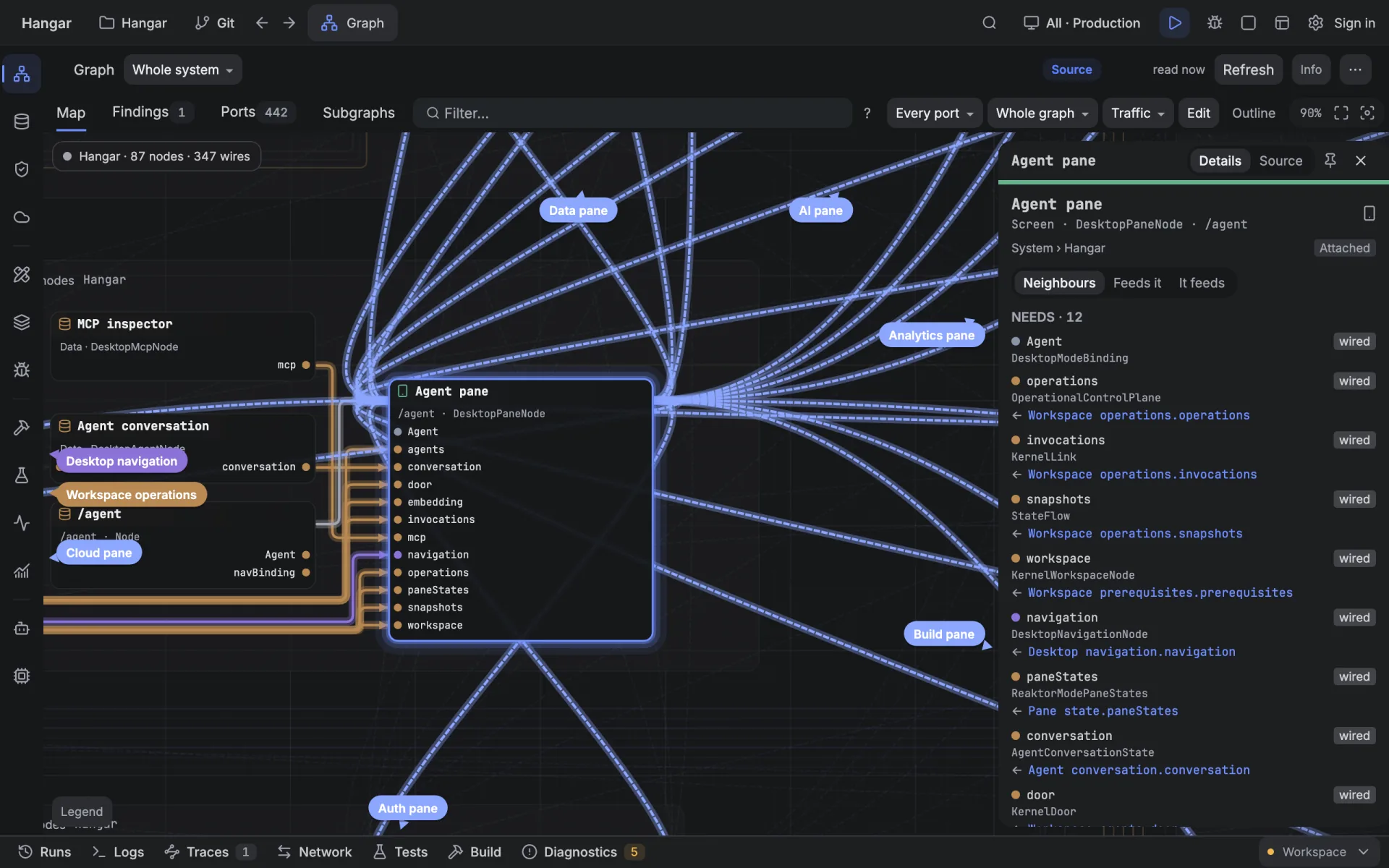
Graph.shape(). The selected node's wires are highlighted, and the inspector lists each input with the node that provides it.Editing the graph in Hangar#

The Graph pane can also change the graph. Press Edit and the map becomes an editor. Drag from an output pin to an input pin to wire them. While you drag, the editor says whether the drop is allowed and why. Delete removes the selected wire or node, and dragging a pin into empty space opens a palette of nodes that can supply or use that value. Each edit joins a list of changes, and the list of problems updates after every edit, so an input that loses its provider shows up at once.
Nothing touches the code while you edit. Save stores the edits as a numbered revision of a change set in .reaktor/changes/, a list of operations such as addNode, connect and disconnect. Try with agent asks a coding agent to apply the change set in a scratch copy of the workspace, build it and run the checks that cover it, and Hangar then marks each changed node as passed or failed on the map. Your checkout stays as it was. Apply with agent asks the agent to write the change into the source code. When the app runs again, Hangar compares its graph with the change set and marks the draft as applied. You can also describe a change in words: the agent writes a draft change set, and Hangar opens it on the map for you to review before anything is applied.
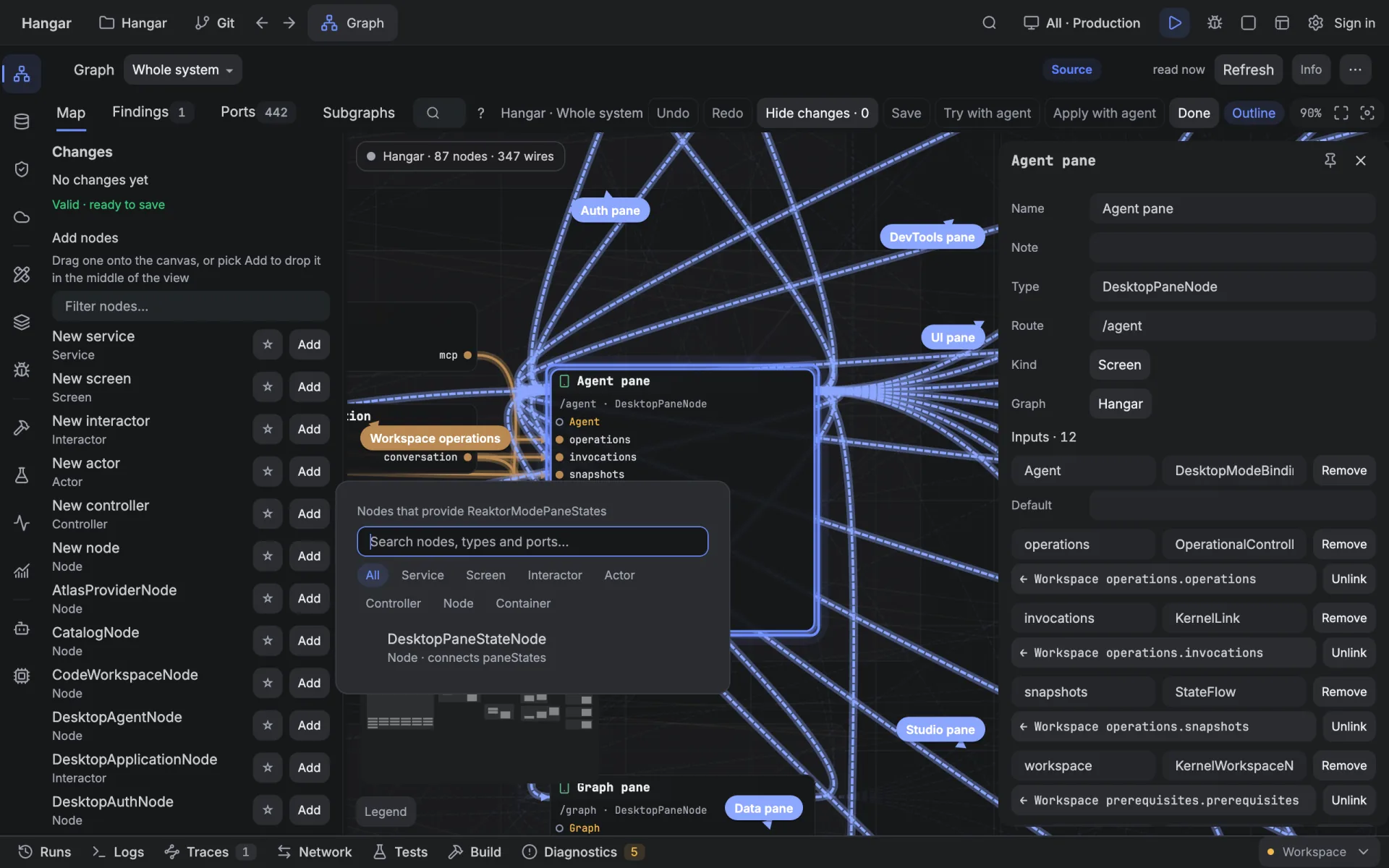
The box below follows the same rules as Hangar's editor, on a slightly larger checkout graph. Some things to try:
- Drag from the
cartoutput ofCartStoreto thepaymentsinput ofCheckoutScreen. The editor refuses with "Type mismatch: needs Payments, provides Cart". - Choose
PaypalPaymentsin the Add list and press Add node. Drag itspaymentsoutput onto thepaymentsinput ofCheckoutScreen. The editor offers to replace the link fromStripePayments, and the change list shows one disconnect and one connect. - Click
StripePaymentsand press Delete. The problems list names every input that lost its provider. - Open Kotlin for the edited graph to see the code your edits describe, and Change set Hangar saves to see what Hangar stores. Undo and Redo work with the buttons or with ⌘Z and ⇧⌘Z.
interface Cart
interface Payments
interface Receipts

class CartStore(graph: Graph) : BasicNode(graph), Cart {
    val cart by provides<Cart>(this)
}

class StripePayments(graph: Graph) : BasicNode(graph), Payments {
    val payments by provides<Payments>(this)
}

class PaypalPayments(graph: Graph) : BasicNode(graph), Payments {
    val payments by provides<Payments>(this)
}

class ReceiptSender(graph: Graph) : BasicNode(graph), Receipts {
    val payments by consumes<Payments>()
    val receipts by provides<Receipts>(this)
}

class CheckoutScreen(graph: Graph) : BasicNode(graph) {
    val cart by consumes<Cart>()
    val payments by consumes<Payments>()
    val receipts by consumes<Receipts>()
}

class CheckoutGraph : Graph(label = "Checkout") {
    val store = Node { CartStore(it) }
    val stripe = Node { StripePayments(it) }
    val receipts = Node { ReceiptSender(it) }
    val checkout = Node { CheckoutScreen(it) }

    init { autoWire() }
}
When you drop a wire, the editor answers with one of these verdicts:
| You drop | The editor says |
|---|---|
| An output on an output, or an input on an input | "Both are outputs" or "Both are inputs" |
| A pin on another pin of the same node | "A node cannot feed itself" |
| Two pins of different types | "Type mismatch: needs Payments, provides Cart" |
| A pair that is already wired | "Already connected" |
| An output on an input that already has a provider | "Replace the link from StripePayments" |
| Two compatible pins | "Connect cart to cart" |
Fix a graph with the editor#
The next box starts from a graph with two problems. InboxStore needs a Clock that nothing provides, and InboxStore and BadgeCounter need each other, so they form a cycle. A cycle works as long as neither node reads the other while it starts, because ports resolve lazily, but that rule is easy to break later, so the editor flags it. Fix both problems with the editor alone:
- Add
SystemClockand drag itsclockoutput onto theclockinput ofInboxStore. One problem is left. - Replace the badge counter with one that listens to events. Add
EventBusandEventBadge, and wire theeventsoutput ofEventBusintoEventBadge. Drag thebadgeoutput ofEventBadgeonto thebadgeinput ofInboxStore. The editor offers to replace the link fromBadgeCounter, and once you drop it the cycle is gone. - Drag the same output onto the
badgeinput ofInboxScreen.BadgeCounternow feeds nothing, so select it and press Delete. The problems list stays empty. - Open Change set Hangar saves. It lists the operations in order: the nodes added, the wires connected and disconnected, and the node removed. This is the list that Try with agent gives the coding agent.
interface Inbox
interface Badge
interface Events
interface Clock

class InboxStore(graph: Graph) : BasicNode(graph), Inbox {
    val inbox by provides<Inbox>(this)
    val badge by consumes<Badge>()
    val clock by consumes<Clock>()
}

class BadgeCounter(graph: Graph) : BasicNode(graph), Badge {
    val badge by provides<Badge>(this)
    val inbox by consumes<Inbox>()
}

class InboxScreen(graph: Graph) : BasicNode(graph) {
    val inbox by consumes<Inbox>()
    val badge by consumes<Badge>()
}

class SystemClock(graph: Graph) : BasicNode(graph), Clock {
    val clock by provides<Clock>(this)
}

class EventBus(graph: Graph) : BasicNode(graph), Events {
    val events by provides<Events>(this)
}

class EventBadge(graph: Graph) : BasicNode(graph), Badge {
    val badge by provides<Badge>(this)
    val events by consumes<Events>()
}

class InboxGraph : Graph(label = "Inbox") {
    val store = Node { InboxStore(it) }
    val counter = Node { BadgeCounter(it) }
    val screen = Node { InboxScreen(it) }

    init { autoWire() }
}
What it improves#
| Usual approach | What goes wrong | Reaktor's approach |
|---|---|---|
| Globals, singletons and service locators | A class fetches what it needs from a global registry, so its dependencies are hidden in its body. Nothing can list them or draw them, and a missing one shows up only when that code runs. | Every dependency is a declared port. The graph lists the ports, wires them at start-up and stops with a named error when one has no provider. |
| Dependency-injection containers such as Dagger, Hilt and Koin | Dagger and Hilt check the wiring at compile time, but they run only on the JVM and Android. Koin runs on every Kotlin platform and resolves each dependency when it is first requested, unless a test verifies the modules. None of them records, while the app runs, which object feeds which. | The same wiring rules run on Android, iOS, the browser, the JVM and Cloudflare Workers, and the wired structure stays available as data while the app runs. |
| Separate libraries for navigation, lifecycle, dependency injection and coroutines | Each library has its own idea of a scope, and the scopes have to be kept in step by hand. | One graph owns all four, so a feature's screens, scope and coroutines start and stop together. |
| Architecture diagrams drawn by hand | A diagram shows the design on the day it was drawn and then drifts from the code. | Hangar draws the map from the running app and the deployed Workers, so it shows the structure as it is now. |
| Visual editors that generate code | Changes made in the generated code cannot be loaded back into the editor, so teams stop using the editor. | The editor saves a change set, an agent applies it to the Kotlin, and Hangar reads the result back from the running code. |
Limitations#
- Wiring is checked when the graph starts. The compiler cannot see an input without a provider.
requireFullyWired()andwire()catch it at start-up, so keep a test that builds each graph, as BestBuds does inFeatureGraphTest. - Types are compared by class. Generic arguments are not part of a port's type, so a consumer of
StateFlow<Int>can be wired to a provider ofStateFlow<String>. Wrap such values in a named class when two ports would otherwise share one. Matching is also exact: a provider declared asprovides<StripePayments>(this)does not serve a consumer ofPayments. Declare the provider with the type its consumers ask for. - Keys are property names. Renaming a property changes its key, and a code shrinker can rename properties in a release build. Ports that wire by type are not affected. Ports that rely on a key need keep rules.
- A duplicate key is not an error. When two nodes in one graph provide the same type under the same key,
autoWire()takes the one declared first. Hangar reports the pair as a Duplicate finding. - Nodes created on demand appear only while they exist. A node that the app creates later, such as one session per open conversation, is part of the shape only while it is alive.
- Applying an edit needs an agent and a build. The Graph pane edits a draft. A coding agent turns the draft into Kotlin, and only the next run of the app confirms that the graph matches the draft.
- The playgrounds on this page are a model. They parse a small part of Kotlin and follow the rules above for a single graph. They do not run the real runtime, so parent graphs,
dependsOn, dependency injection andwire()are not part of them.
Reference#
| Module | What it holds | Main files |
|---|---|---|
reaktor-graph-port | Ports, keys and types, connect(), port events and interceptors. | port/ProviderPort.kt, port/ConsumerPort.kt, graph/connect.kt |
reaktor-graph-runtime | Graph, the node types, autoWire(), wire(), requireFullyWired() and shape(). | graph/core/Graph.kt, graph/core/GraphShape.kt |
reaktor-graph | Compose screens and containers that render a graph on every platform. | |
reaktor-blueprint | The map and the graph editor that Hangar uses. |
GraphWireTest in reaktor-graph-runtime covers wire(), the nearest-provider rule and ties.
- Framework overview places the graph among the other modules.
- Services covers service contracts as nodes and relays.
- Actors covers nodes with a mailbox.
- Graph pane covers how Hangar lays out and draws a graph, and its findings.
- Hangar covers the desktop app the Graph pane lives in.
- Reaktor V2 (Deprecated) is a deprecated historical design study. Never build new work on V2; Reaktor moves directly from today's V1 runtime to Reaktor V3.