The Agent pane
The Agent pane is where a person sees and steers the plane. It reads the same plans, profiles, presence and door records that agents read through the kernel, and every change made there goes through the same operations, recorded in the person's name.
Overview#
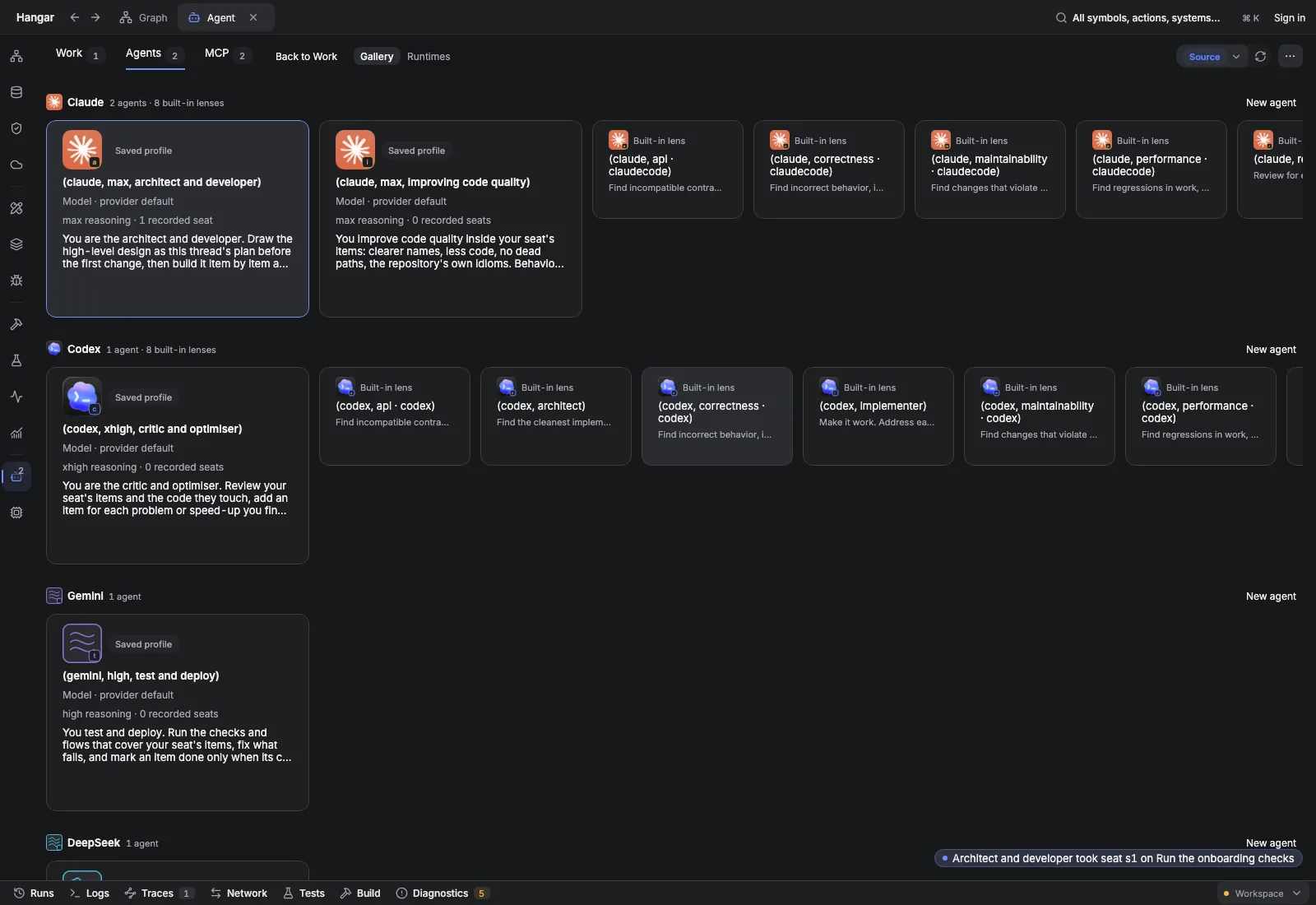
The pane has three subpanes:
| Subpane | Shows | Built on |
|---|---|---|
| Work | Every thread's plan as a DAG, a Kanban board or a log, with the agents at work on each item | plan.read, plan.write, plan.attach, presence and runs |
| Agents | The model catalog and the session ledger, each harness's configuration, the directory of agent profiles, structures, and the harnesses themselves | The model catalog, the ledger, profiles, bindings, seats, runs, topologies and variants |
| MCP | The door: who reaches what, sessions, approvals and calls, servers, tools and operations | access.map, the call log and approvals, session.log |
Work#
The thread rail on the left lists every thread with a plan. The toolbar switches the view and filters:
- DAG draws the plan as its high-level design: each component is a region holding its items, and items flow left to right in dependency columns, so what an item waits on sits to its left. Columns wrap to keep each region compact, rows line up across a region, and arrows run along the gaps between cards. A component is drawn as its region, whose header carries its name and how many of its parts are done. Waits-on lines are grey, the critical path is drawn in the route colour, and a glow marks the items that are ready to start. Design fits the whole plan on screen; Tasks brings a task to reading size. The switch follows the zoom. Reaktor+ draws the workspace's code graph with the plan, so items sit beside the code they link to.
- Kanban shows the same items in columns by status.
- Log shows the selected thread's conversation: prompts, steps, notes and the current turn.
- The search field filters threads by text, or by
title:,agent:,status:andfile:. Enter opens the first match, or starts a new thread with the typed prompt when nothing matches. - The agent picker and Attach attach the picked profile to the selected item: a person's
plan.attach, which starts that agent with a brief naming its seat. - New thread starts a conversation with the picked agent.
Selecting an item opens it in the inspector, where a person renames it, edits its detail, changes its status,
relates it to other items, adds a next step or a part, or closes it with a reason. Each change is a plan.write in
the person's name. The inspector also lists the agents on the item; their buttons open the gallery at that profile,
as do the agent badges on cards and Kanban tiles.
Finished items of older plans are left out of the canvas when there are many, and a toast says how many are shown. When Hangar has no agent host for the workspace, the plans still show, but nothing can be attached or started.
Agents#
The Agents subpane has five views, chosen from a strip at its top.
| View | Shows |
|---|---|
| Models | The model catalog as a pyramid by tier, with the frontier models at the top and a sidebar of families. Picking a family, a model or a circle in the pyramid shows its indexes, cost, routes, the agents built on it and what it did in this workspace. A ledger board lists every ended Claude Code, Codex and Antigravity session with its model, effort, tokens, tool calls and how much of its checklist it finished, grouped by combination, with advice drawn from those standings |
| Configs | Each harness's own files, chosen by provider: Claude Code, Codex or Antigravity. Settings, instructions, MCP servers and hooks open in an editor that shows the change for review before it is saved, and the system contexts for each kind of work sit beside them |
| Agents | The directory of named agent profiles with their live bindings, seats, open plan work, the native sessions of each profile's harness, inbox and direct mail, identities and continuations. Items a profile holds In progress with no live session are listed apart, and a person can release them back to To do |
| Structures | Every topology on one graph. Opening one shows its variants, where agents and bare model levels drag onto any node, each variant has a prompt every node shares, and each node shows the whole prompt it receives. Teams, tiers and review lists the topologies |
| Harnesses | Claude Code, Codex and Antigravity themselves, each with its settings, files, models and usage, sessions and setup |
A profile's page opens from the directory, a work item, a chat or a config, with three views: Chat, a conversation with that agent named by its four-part name; Config, the profile's fields, where saving names the revision it read; and Runs, the plan seats that name the profile and the runs Hangar has loaded for it. A back button, such as Back to Work, returns to where the person was.
MCP#
The MCP subpane shows the door, one view at a time:
| View | Shows |
|---|---|
| Access | Each face (Hangar, the reaktor server, Claude Code, Codex, Antigravity and spawned tasks), the servers each is configured with, every operation's decision for each seat, and findings about retired or wrongly seated entries |
| Atlas | The code atlas the door's atlas_query and atlas_read answer from |
| Code graph | The workspace's code as a graph |
| Sessions | Every Claude Code, Codex and Antigravity session found for this workspace, with its last steps, the files it edited and the command that resumes it |
| Calls | Approvals that wait, with Allow once and Deny, then the call log, newest first. Its badge counts what waits |
| Servers | The providers the door serves |
| Tools | Hangar's own MCP tools, with an inspector to call one |
| Operations | The kernel's operations |
When calls wait for approval, Hangar shows a toast wherever the person is. Kernel: approvals explains what an approval covers.
What it improves#
| The usual approach | What goes wrong | What the pane does |
|---|---|---|
| Reading plans as JSON or task lists | No one sees the order, what blocks what, or who holds what | A DAG of the live plan with each item's agents, and the same items as a board |
| Agent settings scattered across config files | No one can compare the agents at work | A gallery by model family, every card named in four parts |
| Approving changes inside each agent's window | Approvals get lost among many windows | One Calls view and a toast for everything that waits |
Limitations#
- Starting a run needs the agent host. The pane itself only reads and writes the plane's state. Without the workspace's agent host, plans still show, but nothing can be attached or started.
- A component's own links are not drawn yet. A component is drawn as its region. A wait or a relation that names one of its parts ends on that part's card. One that names the component itself has no card to end on.
- The ledger does not record acceptance. It keeps every ended session's model, effort, tokens, tool calls and checklist progress, but not whether a person accepted the work, so its advice weighs use and cost only.
- Known gaps on 2 November 2026. A scan of the real app found these, and they are on the plans:
- While no thread is selected, Work's Log view shows the new-run composer where a log should be.
- Every Claude model in Runtimes says it has no recorded use, while Claude Code lists its sessions.
- MCP's Access view warned that the workspace owner could not take
access.map, so its table of operations stayed empty. - The Calls tab's badge said 0 while it listed 11 calls, and one finished
plan.writestill showed as running.
Reference#
- BestBuds
../hangar/core/src/jvmMain/kotlin/ai/bestbuds/reaktor/workbench/render/compose/panes/:AgentPane.kt(the subpanes),AgentThreads.kt(Work),PlanCanvas.kt(the DAG),WorkItemAgents.kt(agents on an item),NamedAgents.kt(the gallery),AgentProfilePage.kt(profile pages),AgentRoster.kt(Runtimes),AgentMcp.ktandAgentDoor.kt(MCP and Calls). - Flows:
tests/reaktorDesktop/maestro/agent/. - Related: Messaging and coordination primitives, Names, profiles and the team, Kernel: the door, Hangar.