Auth
reaktor-auth answers two questions for every call: who is calling, and may they do this. heimdall, a Postgres schema, records people, services and agents, the apps and tenants they belong to, and the roles they hold. The auth server, which is itself a reaktor-graph of 14 nodes, turns a sign-in into a short-lived signed token. Every Worker, server and graph port verifies that token locally and then asks a relationship model: an OpenFGA engine that runs in process, whose objects are the code's own graphs, services and operations. Each app declares its roles in code next to that model, and Hangar's Auth pane keeps heimdall in step with them. The agent kernel uses the same engine to decide what each AI agent may do.
This page is the design at a glance; the Auth reference has the detail. It covers reaktor-auth-core, reaktor-auth, heimdall and Hangar's Auth pane, for BestBuds, CompanyOS, Manna and Hangar. In every figure, green is the repository, amber is heimdall, blue is a running service, violet is Hangar and grey is a caller or provider outside. Dark lines and numbered dots trace the path a section is about, and dashed lines are optional links.
The page starts with the whole picture and a playground for the token check, then explains each part, what the design improves on and where it falls short.
Overview#
Callers sit at the top of the picture. The auth server and heimdall sit on the left; they are the only places that issue tokens and store people. Everything a caller actually uses sits on the right: Workers, Spring servers, graph ports and the agent kernel. None of them asks the auth server whether a token is good. Each verifies the token's signature itself, with the public keys the auth server publishes.

Figure 1. Callers prove who they are at the auth server once (1 to 3), then send the access token on every call (4). Workers, servers and graph ports check the token with the published keys (5) and ask the model that ships with the code. heimdall holds people and roles, and Hangar manages heimdall and the role files.
The access model and the role catalog are files in the repository. Workers and the auth server have them compiled in, and Hangar loads the same files, so every checker applies the same rules as the code it guards. heimdall is the one store of people, memberships and role grants. Hangar's Auth pane reads it directly and changes it only in audited transactions.
The agent kernel works a little differently. AI agents reach it through their seat, such as codex or claude, and
carry no token. The kernel decides each of its operations with the same engine and its own model, auth/hangar.fga,
which lets every seat call every operation, in shadow mode, until a grant narrows it.
Try it#
Before any relationship is checked, LocalAuthorizer compares the claims in a verified token with what the operation
requires. It runs one gate at a time and stops at the first that fails. The box below holds a token's claims and an
operation's requirement. On the right, a line joins each permission the call needs to the permission in the token that
covers it. Below, the gates are listed in order with what each one found, and why each permission is covered. The
playground ports LocalAuthorizer and the rules in Capability.kt and Ceiling.kt, without the resource gate and
the anyOf and allOf alternatives.
Some changes to try:
- Change the required
data:read@reports/2026todata:read@users. Nothing the token holds covers it, becausedata:write@reportscovers reading reports, not users. The call fails at Permissions with 403. - Then add
superadminto the token's roles. A superadmin of the tenant skips the permission list, but the call now fails at the credential ceiling:data:*@reportsdoes not reach@users. - Change the token's
audiencetohangar. The first gate fails with 401, and no later gate runs. - Add a line
delegated by billing-workerto the token. The call fails at Delegation, unless the requirement saysdelegation allowed. - Leave
ceilingwith nothing after it. A ceiling that reaches nothing refuses every permission, which is also what happens when the claim cannot be read.
The token also takes principal service, and the requirement takes roles.
# The claims in a signed-in user's access token
token
  app docs
  tenant acme
  audience docs
  principal user
  roles editor
  permissions data:write@reports, messages:write
  ceiling data:*@reports, messages:read

# What the operation requires
requirement
  app docs
  tenant acme
  audience docs
  principals user, service
  permissions data:read@reports/2026, messages:read
The relationship check that runs next, can_invoke on the operation, has its own playground under
Try a check.
How it works#
The sections below follow one person from their identity to a decided call: who they are in heimdall, the token they sign in for, the checks every call passes, the relationship model those checks ask, how the code becomes that model's objects, roles, tenants, and how Hangar manages all of it.
Who is who: identity, apps and tenants#
A person is one identity, shared by every app. Each way they sign in, such as a Google or an Apple account, is a
provider account attached to that identity. Accounts are matched by the provider's issuer and subject; an email
address never links two accounts. The identity acts through a principal, and the principal is what a token names in
sub. Services and agents are principals with no identity behind them.
Everything else belongs to one app and carries its app_id. A tenant is an organisation inside the app, and a context
is a smaller scope where a grant can apply. A membership puts a principal into the app, optionally inside one tenant
and one context. A role grant gives a principal one role, optionally only inside one context. When a token is minted
for a membership, heimdall collects the roles that apply there and the permissions those roles hold. The token carries
both lists, with the app as aud, the tenant as tid and the context as ctx.

Figure 2. The heimdall tables behind a token. Everything inside the right frame belongs to one app. A token is cut for one membership, so it names one app, at most one tenant and at most one context.
Permission names#
Permissions are written group:action@path. An action covers the levels below it: admin covers every action in its
group, and write covers read. The permission * covers everything. A path narrows a permission to part of the app
and covers everything under it, so a holder of data:write@reports passes a check for data:read@reports/2026 and
fails one for data:read@users.
A role named superadmin covers every permission inside its own tenant, including permissions added later. It only
skips the permission list. Every other gate still applies: the app, tenant, audience and context, the kind of
principal, the credential's ceiling, any role the requirement names, and the rule for delegated calls.
A personal access token, and every access or delegated token exchanged from one, carries a ceiling: the ceil claim
lists the permissions that credential may ever reach. A permission outside the ceiling is refused even for a
superadmin, and the relationship check runs a second time with only the ceiling's permissions before it allows a call.
A ceil claim with an unknown version, or one that cannot be read, closes the credential, so it reaches nothing that
needs a permission. Tokens made from older personal access tokens, minted before ceilings existed, have no ceiling.
Signing in and the tokens it returns#
The auth server is one reaktor-graph, AuthRuntimeGraph. Each of its 14 nodes declares the ports it provides and the
ports it needs. autoWire() connects them, and requireFullyWired() stops the server from starting if any port is
left unconnected. In reaktorServer the graph runs inside Spring, where a thin adapter hands it the database adapter and
the signing keys, and installs a web filter that turns each bearer token into an AuthContext.

Figure 3. Each card is one node of AuthRuntimeGraph. A link runs from the node that provides a port to the node that
uses it. The dark links and the numbered dots trace a sign-in; the faint links are the rest of the wiring.
- The app gets an ID token from Google or Apple and posts it, with its app id, to
/auth/sign-in. The Auth service hands it to Login. - Login asks the Jwt node to verify the ID token against the provider's keys.
- The Repository node finds the provider account, identity, principal and membership in heimdall, creating any that are missing, and reads the roles and permissions of that membership.
- The Session lifecycle node opens a session and its first refresh token.
- The Jwt node mints the access token: ES256, type
at+jwt, signed with the stable key whosekidthe JWKS publishes. - The Audit node records the mint, and Login returns both tokens.
| Credential | What it is | Lifetime | Used for |
|---|---|---|---|
| Access token | ES256 JWT, type at+jwt, checked against the JWKS | 1 hour | Every API, Worker, graph and service call |
| Refresh token | rkr_ opaque token, stored as a SHA-256 hash | 30 days from sign-in; a new one on every use | Renewing a session. Replaying an old one revokes the whole family, with a 60-second grace for two tabs refreshing at once |
| Personal access token | rkt_ token with an offline checksum, stored hashed | Until it expires | CLI, MCP tools and CI, exchanged at /auth/token for an access token |
| Service account | Client id plus a private-key JWT or a secret | Until rotated | client_credentials for Workers and servers calling each other |
| Delegated token | Access token whose act claim names the service acting (RFC 8693) | Short | A service or agent working for a person |
| Tenant token | Access token for one tenant and one permission | 60 seconds at most | An operator switching tenant (see Tenants) |
| Guest session | The normal token pair with credential_type=anonymous | Like a session | Trying an app before signing up |
Every checker pins the issuer, the audience and the expiry. Workers use WorkerJwtVerifier, which keeps the key set in
isolate memory, then in the data centre's Cache API, then in KV, and fetches it only on a miss or an unknown kid.
Spring servers use ReaktorSecurityWebFilter, and other JVM code calls JwtVerifier directly.
The auth server checks its own routes against the model too. Callers who are not signed in reach only its sign-in routes, and one of the five model tests in the BestBuds store checks exactly that.
How one call is decided#
A guarded call passes up to four checks, in this order.

Figure 4. The four checks of one guarded call. A failed token check answers 401. The requirement check answers 403, or 401 when the token was issued for another audience. The relationship check refuses only in enforce mode.
The first two checks read only the token. The token check proves who is calling and builds an AuthContext. The
requirement check, LocalAuthorizer, compares the names in that context with an AuthRequirement: the app, tenant and
audience the call must be for, the kinds of principal allowed, and the permissions or roles it needs.
The third check asks the relationship model whether the caller has can_invoke on the operation being called. The
caller's token becomes contextual tuples for this one check, so the engine reads no database. Each service runs in one
of two modes. In shadow mode the decision is recorded and the call goes on; in enforce mode a denial refuses the call.
Modes are set per service in the store, with * as the default, and BestBuds runs every service in shadow mode. A
Worker whose model fails to load logs why and checks nothing.
The fourth check is for handlers that need an answer about one object, such as whether Ada may view circle alpha.
ObjectAccess.decide asks the model with the facts the handler has just loaded, such as the circle's members, added as
contextual tuples.
Checks two to four each produce one AccessDecision. It rides on the call's span, Workers log the ones that deny, and
Hangar's Access tab replays recorded decisions against the saved model and any draft. A model change therefore shows
which real calls it would start refusing before it ships.
The relationship model#
OpenFGA itself is not deployed anywhere. The fga package in reaktor-auth-core is a Kotlin engine that reads OpenFGA's
modelling language (schema 1.1), validates a model, and answers Check with an explanation, Expand, ListObjects and
ListUsers. It is common Kotlin, so the same engine runs in Workers through Kotlin/JS, in the JVM servers, in the agent
kernel and in Hangar.

Figure 5. The types in config/access/bestbuds.fga. Roles and permissions sit between callers and the code's objects, so a
grant can name one caller, a role's members or a permission's holders. Every app starts from the same code types and
may add its own, as BestBuds adds circle.
BestBuds and Reaktor keep their model and store together in config/access/. The reader also accepts workspace catalogs under auth/ during the move. This is the whole BestBuds model:
model
  schema 1.1

type user

type service_account

type agent

type role
  relations
    define assignee: [user, service_account, agent, role#assignee]

type permission
  relations
    define holder: [user, service_account, agent, role#assignee]

type graph
  relations
    define parent: [graph]
    define owner: [user, role#assignee] or owner from parent
    define operator: [user, service_account, agent, role#assignee] or owner or operator from parent
    define viewer: [user, service_account, agent, role#assignee] or operator or viewer from parent

type service
  relations
    define graph: [graph]
    define owner: [user, role#assignee] or owner from graph
    define caller: [user, user:*, service_account, service_account:*, agent, agent:*, role#assignee, permission#holder] or owner or operator from graph
    define viewer: [user, service_account, agent, role#assignee] or caller or viewer from graph

type operation
  relations
    define service: [service]
    define invoker: [user, user:*, service_account, service_account:*, agent, agent:*, role#assignee, permission#holder]
    define blocked: [user, service_account, agent, role#assignee]
    define can_invoke: (invoker or caller from service) but not blocked

type circle
  relations
    define member: [user]
    define blocked: [user, role#assignee]
    define viewer: member but not blocked
Tuples come from six places:
| Source | Example tuple | Read |
|---|---|---|
| The code's structure | operation:bestbuds.circles.discover#service@service:bestbuds.circles | When the model loads |
A contract's ServiceAccess | service:bestbuds.circles#caller@role:authenticated#assignee | When the model loads, and again for the operation being called |
| The role catalog | permission:companyos:audit:view#holder@role:companyos:auditor#assignee | When the model loads |
| Tuples written in the store | None in BestBuds | When the model loads |
| The caller's token | role:authenticated#assignee@user:ada, plus one tuple for each role and permission the token names | On every call |
| Facts a handler loaded | circle:alpha#member@user:ada | On each object check |
The store also carries tests that run against the model. BestBuds has five, among them "callers who are not signed in reach only public services" and "a circle's members see it unless they are blocked".
Try a check#
The box below holds a small model in the same language, the tuples it reads, and a few checks. It runs a TypeScript
copy of the fga package's check, which answers each one the same way and gives the same explanation. Choose a check
to see why it was allowed or denied. The tree under Why is the engine's own explanation, and the picture marks the
tuples that allowed the check in green and any tuple that blocked it in red.
Things to try:
- Leave it as it is. Grace may call
chat.sendand Ada may not. Grace's path runs through five tuples: she is an assignee ofrole:ops, ops operatesgraph:app,graph:appis the parent ofgraph:app/chat, thechatservice sits in that graph, andchat.sendbelongs to the service. - Give Ada the role: add
role:ops#assignee@user:adaundertuples. Her check is now allowed. A token that names the role adds this same tuple for one call, which is how the real check reads it. - Block Grace: add
operation:chat.send#blocked@user:grace. Her check is denied, and the blocking tuple turns red.but not blockedwins over every grant. - Move the service: change
service:chat#graph@graph:app/chattoservice:chat#graph@graph:billing. Grace loses access, becausegraph:billinghas no parent and nobody operates it. Moving code moves its access with it. - Open the service to everyone: add
service:chat#caller@user:*. The tuple is refused, becausecalleradmits onlyuserandrole#assignee. Adduser:*to caller's type list and Ada may call it too, unless she is blocked. - Break the model: change the operator line to
define operator: operator from parent. Nothing could ever grant it, so the model does not load and nothing is checked, just as a Worker would refuse it.
model
  schema 1.1

type user

type role
  relations
    define assignee: [user, role#assignee]

type graph
  relations
    define parent: [graph]
    define operator: [user, role#assignee] or operator from parent

type service
  relations
    define graph: [graph]
    define caller: [user, role#assignee] or operator from graph

type operation
  relations
    define service: [service]
    define invoker: [user, role#assignee]
    define blocked: [user, role#assignee]
    define can_invoke: (invoker or caller from service) but not blocked

tuples
  role:ops#assignee@user:grace
  graph:app#operator@role:ops#assignee
  graph:app/chat#parent@graph:app
  service:chat#graph@graph:app/chat
  operation:chat.send#service@service:chat

checks
  user:grace can_invoke operation:chat.send
  user:ada can_invoke operation:chat.send
The code is the object tree#
The model's objects are computed from reaktor-graph. CodeAccess.resources walks a graph's shape. Each scope that holds
a service becomes a graph object whose parent is the enclosing scope. Each service node becomes a service object
linked to its graph, and each operation of its contract becomes an operation object linked to the service. A contract
declares who may call it with ServiceAccess, for example Callers.SignedIn, and that declaration becomes a caller
tuple on the service. When an operation names callers of its own, they replace the service's for that operation, and
each operation gets an invoker tuple instead.

Figure 6. Four pieces of code become four objects, and the parent, graph and service links come from the code. Ada may
call discover because her token makes her an assignee of role:authenticated and the contract declares signed-in
callers.
Because the parent links come from the code, moving a service into another graph moves its access with it, and a grant
on a graph reaches every service and operation beneath it. Each runtime holds the links for its own island:
CodeAccess.island puts the island's graph under the app's root, graph:bestbuds/messaging under graph:bestbuds,
and links each contract the island guards to it. Workers build these links from the contracts they serve and the auth
server from its contract list, so graph:bestbuds#operator@role:ops#assignee reaches every island and a grant on
graph:bestbuds/messaging reaches the messaging Worker only. A Durable Object's island sits under its Worker's island,
built from a path such as listOf("chat", "ChatService"). Hangar builds the same links from the island catalog the
Workers export, with the same function, and answers each island the way it answers itself.
Guards sit in two places. RelationAccess is a service interceptor: Workers install it on the contracts they serve,
and the auth server installs it on its own two services. Graph.guard installs AccessGuard on every port of a graph
that has a requirement, belongs to a contract operation or was declared with providesProtected. It follows nodes and
child graphs added after it starts and releases them when they leave or the graph closes, so calls between nodes inside
one process are checked the same way as calls over HTTP. A port declared with providesProtected is checked as its
own object in the model, a port linked to its node and that node's graph, so a grant can name the port, its node
or any graph above it.
A port can also carry its own AuthRequirement through SecuredProviderPort or SecuredConsumerPort. AccessGuard
then scopes any required permission that has no path to the port's place in the graph: messages:write on a port is
checked as messages:write@<graph>/<node>/<port>, so a holder of messages:write@<graph> may use the ports inside
that graph and no others.
Roles as code#
Each app declares its roles in the roles list of its .fga.json store, next to the model. A role has a name, a
title, a description, its permissions and the roles it includes.

Figure 7. One file declares the roles. The model reads it directly, and heimdall follows it through Hangar's sync plan. Giving or taking a role writes heimdall directly, with its own audit events. The dashed path starts a catalog for an app that has none.
RoleCatalog checks the list once and refuses anything heimdall or the model could not hold. It then flattens
includes, so companyos:superadmin carries every permission of the four roles it includes. From there the roles go two
ways. CodeAccess.tuples turns them into model tuples, which every load of the store adds, so a Worker, the auth
server and Hangar all see the same roles. heimdall gets them through Hangar: the Roles tab compares heimdall with the
catalog role by role and builds a sync plan. Retiring a role that people hold takes it from them, so the plan offers
retiring and dropping as choices. The chosen steps run in one transaction with a ROLE_CHANGE audit event.
heimdall stores each role with its flattened permissions, so issuing tokens did not need to change: a holder's next token carries everything the role implies.
The Roles tab labels each role In heimdall, Not in heimdall yet, heimdall differs, Not in the catalog, Test
leftover or No catalog yet. An app with no catalog can start one from what heimdall holds, leaving out test
leftovers. BestBuds declares six roles: e2e for the Karate suite, and five companyos roles, which live here because
CompanyOS signs in through the BestBuds app id.
Apps, tenants and switching between them#
Tenancy has three levels. The app is the hard boundary: a token names exactly one app as its audience, every check pins it, and an app's roles mean nothing in another app. A tenant is an organisation inside an app, and a context is a smaller scope. A membership, and so a token, carries at most one of each.
LocalAuthorizer runs these gates in order and stops at the first one that fails:
| Gate | Fails when | Answer |
|---|---|---|
| Token | There is no verified token | 401 |
| Audience | The token was issued for another audience | 401 |
| App | The token is for another app | 403 |
| Tenant | The token is for another tenant, or for none | 403 |
| Principal kind | The caller is a kind the requirement does not allow | 403 |
| Resource | The resource's app, tenant or context differs from the token's | 403 |
| Alternatives | No requirement in anyOf allows the call, or one in allOf refuses it | That requirement's answer |
| Permissions | A required permission is not covered, and the caller is not superadmin of the tenant | 403 |
| Credential ceiling | The token's ceil claim does not reach a required permission, even for a superadmin | 403 |
| Roles | A required role is missing | 403 |
| Delegation | The call is delegated and the requirement does not allow it | 403 |
Switching tenant#
An operator signed in to one app can act in a tenant of another app without signing in again, through the tenant authority routes.

Figure 8. A tenant switch. Every resolve reads heimdall again, checks the one permission asked for and writes the audit event before it mints anything.
The switch never copies authority from the token the operator already has, including a superadmin role. Each resolve
reads heimdall again for that exact app, tenant and context, checks the one permission with LocalAuthorizer and the
model, and writes the TOKEN_EXCHANGE audit event before minting anything. If that write fails, no token is issued.
The new token carries only that permission as its scope and lives at most 60 seconds, never past the source token or
session. Only a person's own access token can start a switch; a PAT, a service token or a delegated token cannot.
Where tenancy goes next#
The unified context proposal replaces the separate tenant and context columns with one context tree, so that a grant at any node covers everything beneath it. It is a design with no code yet.

Figure 9. Today and the proposal. Today a grant names one context and nothing inherits. In the proposed tree a grant covers its node and every node beneath it, so tenant isolation becomes a property of the tree.
Two gaps are known. CompanyOS signs in through the BestBuds app id, so its roles sit in the BestBuds catalog until it gets an app of its own. And one identity shared by every app suits a single owner's apps; customers who each need a sealed user pool would need that assumption revisited.
Managing it from Hangar#
Hangar's Auth pane has six tabs, all reading heimdall through the workbench kernel. Writes to production need the
data-writer role in Reaktor and pass through the same gate as the Data pane.
Every write is one transaction with an audit event.
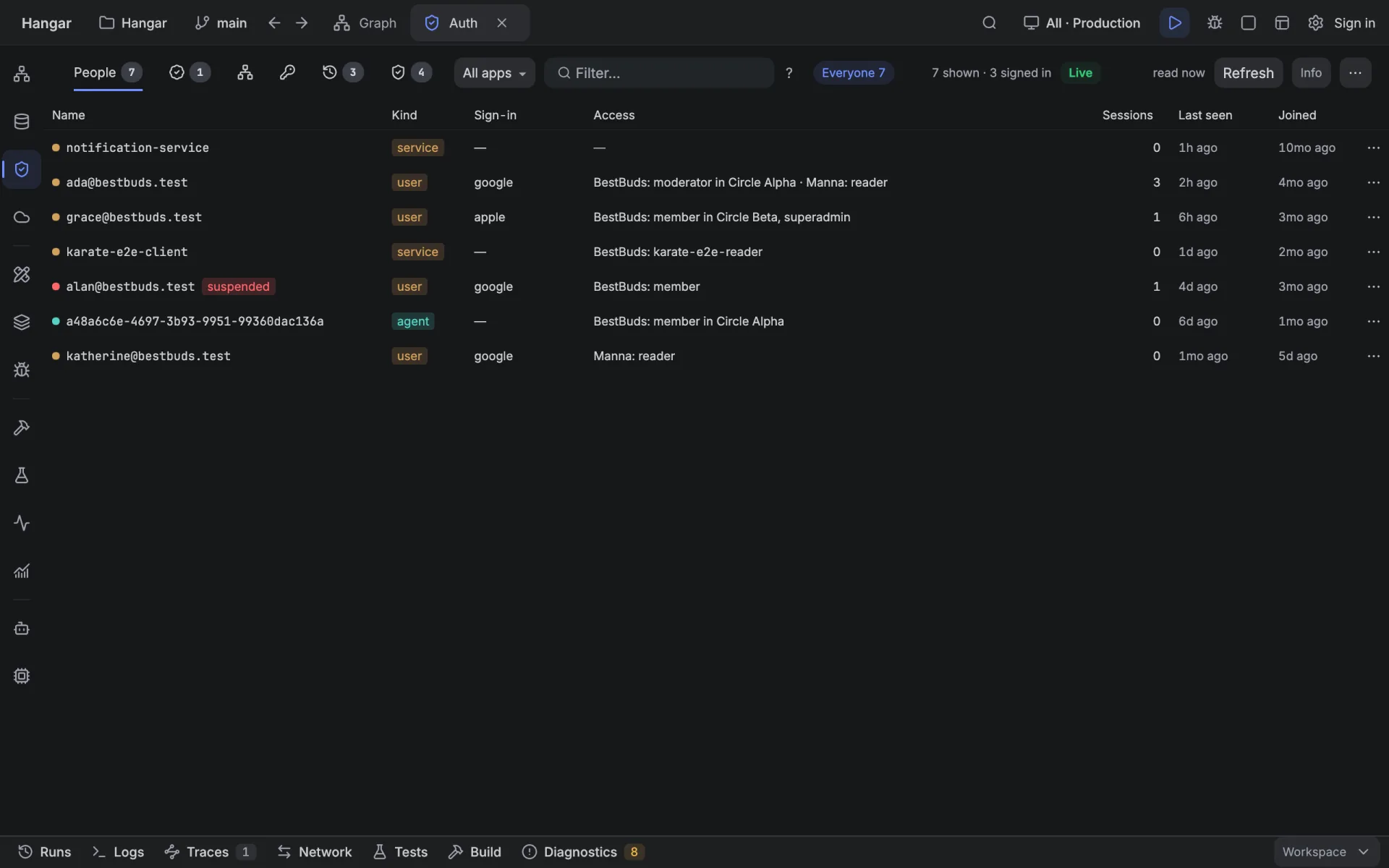
| Tab | What it is for |
|---|---|
| People | The directory. A person's roles in each app, with give and take, and Can they…?, which runs LocalAuthorizer on what a token of theirs would carry in one membership |
| Roles | The catalog beside heimdall, a role wizard with service and permission selection, live reach and separate save, assign and sync actions |
| Access | One workspace with Graph, Relationships, Matrix and Source; a shared caller, policy, selection, checks and draft |
| Sessions | Sessions and personal access tokens, with the token wizard |
| Audit | The trail of mints, refreshes, exchanges, revokes, failures and role events |
| Security | Findings, including roles that no catalog declares, the trust map and table exposure |
Access uses the same system graph as the Graph pane. Protection marks distinguish public, signed-in, permission-protected, unguarded and unknown operations. The Looking as control shows a person or role’s reach. Working and Deployed compare repository policy with policy digests retained in runtime decisions; missing decision evidence stays Unknown. The Graph pane’s Access lens opens an operation in this workspace.
Relationships follows role includes and object relations through bounded neighbourhoods, including intersection and exclusion operators. Source puts the model, tuples and saved checks together. Checks show token, local requirement, credential ceiling, relationship and object stages. Answers from edited policy say Simulated; retained decisions provide Observed evidence.
Create roles from selected operations, read-only access, a duplicate or an included role. The wizard shows permission reach and requires acceptance of extra operations before saving. Assignment and removal preview the whole policy, including surviving paths. Current credentials retain their issued claims; new-token and draft previews show the proposed result. A selected operation can also seed a narrowed token.
Review groups changes by owner: repository source, heimdall, memberships, deployment, credentials and enforcement. Saving files records hashes and refuses stale source. Syncing heimdall and rolling out a requirement are separate actions. Resource sharing shows its deciding relationships; writes stay disabled with an explicit reason when no audited owner operation is connected.
What it improves#
| Usual approach | What goes wrong | Reaktor's approach |
|---|---|---|
| Each service asks an auth server about every token | Every request waits on another network hop, and the auth server becomes a single point of failure. | Access tokens are signed JWTs. Every Worker, server and graph port verifies them locally with the published keys, and nothing calls the auth server per request. |
| Permission checks written by hand in each handler | The checks drift from one handler to the next, and nobody can list who may call what. | Requirements and ServiceAccess declare access next to the contract, and the same LocalAuthorizer decides every call. |
| A hosted authorization service such as OpenFGA or SpiceDB | It is one more service to run, and every check is a network call. | The OpenFGA modelling language runs in process, in Workers, servers, the agent kernel and Hangar. The caller's token becomes contextual tuples, so a check reads no database. |
| Access rules that name URLs or services in a separate policy file | Moving or renaming code silently breaks the rules, or leaves stale grants behind. | The model's objects are computed from the code's own graphs, services, operations and protected ports, so moving a service moves its access with it. |
| Roles edited by hand in a database | Environments drift apart, and nobody knows which roles a release expects. | Roles are declared in code next to the model. Hangar compares heimdall with the catalog and applies the difference in one audited transaction. |
| Long-lived API keys that carry everything their owner may do | A leaked key reaches everything its owner can. | Personal access tokens, and the tokens exchanged from them, carry a ceiling that bounds what they may ever reach, even for a superadmin. |
| Turning on enforcement in one step | A wrong rule locks real users out in production. | Services start in shadow mode. Decisions are recorded, Hangar replays them against a draft model, and enforcement is switched on per service once they look right. |
Limitations#
- BestBuds runs in shadow mode. Its services record each relationship decision but do not refuse calls yet; the token check and requirements still refuse.
- An access token lives until it expires. Signing out revokes the refresh-token family, but an access token already issued stays valid for the rest of its hour, because there is no access-token denylist yet.
- One identity is shared by every app. That suits one owner's apps. Customers who each need a sealed user pool would need that assumption revisited.
- CompanyOS signs in through the BestBuds app id, so its roles sit in the BestBuds catalog until it gets an app id of its own.
- Ceilings cover new personal access tokens. Tokens made from personal access tokens minted before ceilings existed keep their old behaviour.
- The token playground is a model. It ports the gates of
LocalAuthorizerand the capability and ceiling rules. It leaves out the resource gate,anyOf,allOfand scopes, and it does not run the relationship check, which Try a check covers.
What is built and what is open#
Built:
- The auth server as a reaktor-graph; ES256 tokens with a stable key and JWKS; rotating refresh tokens with reuse detection; PATs, service accounts, guest sessions, delegated tokens and tenant switching.
- The audit trail, including role grants, revokes and catalog syncs.
- The in-process OpenFGA engine,
can_invokeon every guarded call in Workers and the auth server, and object checks with loaded facts. - The role catalog: validation, flattening, model tuples and the heimdall sync plan.
- Credential ceilings on personal access tokens and the tokens exchanged from them, and guarded ports that are checked as their own objects in the model.
- Hangar's Auth pane with its six tabs.
Open:
- The first production sync of heimdall from the Roles tab, which needs the owner with
data-writer. - Redeploying the Workers and reaktorServer, so that their bundles carry the catalog and their island's structure.
- Moving services from shadow to enforce once the recorded decisions look right.
- An app id of its own for CompanyOS, and catalogs for Manna and the operator app.
- Stored object tuples, and a stored
may_actpolicy for delegation. - Supabase email, magic link and OTP sign-in; browser PKCE, BFF cookies and DPoP.
- The single context tree described under Where tenancy goes next.
Reference#
| Piece | Path |
|---|---|
Kernel: AuthContext, AuthRequirement, LocalAuthorizer, Capability, CredentialCeiling | reaktor/reaktor-auth-core/…/auth/kernel |
OpenFGA engine and AccessDecision | reaktor/reaktor-auth-core/…/auth/fga |
CodeAccess, CodeAccessPolicy, RoleCatalog | reaktor/reaktor-auth-core/…/auth/graph |
RelationAccess, AuthRequirements, ObjectAccess, bearer interceptors | reaktor/reaktor-auth/src/commonMain/…/auth/transport |
AccessGuard, secured ports, AuthNode, code resources | reaktor/reaktor-auth/src/commonMain/…/auth/graph |
AuthRuntimeGraph and its 14 nodes | reaktor/reaktor-auth/src/jvmMain/…/auth/runtime |
| The heimdall schema | reaktor/reaktor-auth/src/jvmMain/…/auth/heimdall.sql |
| Spring adapter, web filter, JWKS | reaktor/reaktor-auth/src/jvmMain/…/auth/spring |
ServiceAccess and Callers | reaktor/reaktor-service/…/service/Access.kt |
| BestBuds model and store | bestbuds/config/access/bestbuds.fga, bestbuds/config/access/bestbuds.fga.json |
| How Workers load and log the model | bestbuds/modules/app/src/jsMain/…/cloudflare/core/BestBudsAccess.kt |
| How the auth server loads the model | services/reaktorServer/…/ServerAccess.kt |
The agent kernel's own model, auth/hangar.fga | hangar/host/…/KernelAccessModel.kt |
| Hangar's Auth pane | hangar/core/src/jvmMain/…/workbench/auth |
CapabilityTest and CeilingTest in reaktor-auth-core cover how permissions cover each other and the ceiling, and
CredentialCeilingIntegrationTest and PortAccessTest in reaktor-auth cover ceilings on real tokens and guarded ports.
The Auth reference goes deeper on each part: the authorization model, sessions, PATs, service accounts, Worker verification, the schema, provider authorization and the open design questions. Secrets covers where signing keys and credentials live.