Manna — Functional Design Handoff
26 September 2026 · Design specification · 85 product screens · 7 reference boards
The Manna canvas now contains 42 desktop screens and 43 mobile screens. All 61 existing product screens were revised, and 24 missing workflow screens were added. The warm paper, green palette and editorial typography remain; the change is functional depth.
The maintained Pencil source is bestbuds/modules/manna.pen. Read this alongside the Manna implementation HLD, which defines the Reaktor Graph, Surface, actors, services, data ownership and migration architecture.
1 What changed
The earlier designs communicated the direction but often stopped at a summary card. This revision follows an object into the operations a person needs: create, locate, select, inspect, edit, compare, link, plan, use, share, review and recover.
| Area | Functional depth now shown |
|---|---|
| Navigation | Eight desktop destinations, global capture/search, contextual views and inspectors. Five mobile destinations with a complete More directory. |
| Memory | Collections, temporal retrieval, bulk selection, object kinds, current and past beliefs, original/derived records and chosen treatment. |
| Sources | Exact passage controls, annotations, provenance, source revisions, failed extraction, anchor repair and downstream review. |
| Learning | Course outline, provider capability limits, three separate progress measures, composed routes, practice queue, support ladder, attempt history and rubrics. |
| Work | Mission portfolio, acceptance criteria, dependencies, project board, private overlay, session artifacts and return points. |
| Planning | Accepted/proposed/protected time, explicit conflicts, feasible windows, unscheduled work and prospective target changes. |
| Rhythms | Quota/calendar/cron basis, qualification, distinct-day counting, maintenance, exceptions, occurrence scope and re-entry. |
| Recommendations | Active purpose, time and cost constraints, actual reasons, uncertainty, alternatives and distinct feedback. |
| AI and rules | Editable context packet, action grants, reviewable proposals, visual rule composition, execution history and unknown-outcome reconciliation. |
| People and exchange | Request-led matching, selected evidence, agreement scope, external work, service offers, delivery, funding state and acceptance. |
| Creator work | Attribution, licence conditions, source versions, eligible usage and disputed statements. |
| Recovery | Local saves, operation queues, field conflicts, offline copies, export/restore, deleted records and a legacy graph import review. |
2 Review the connected journeys
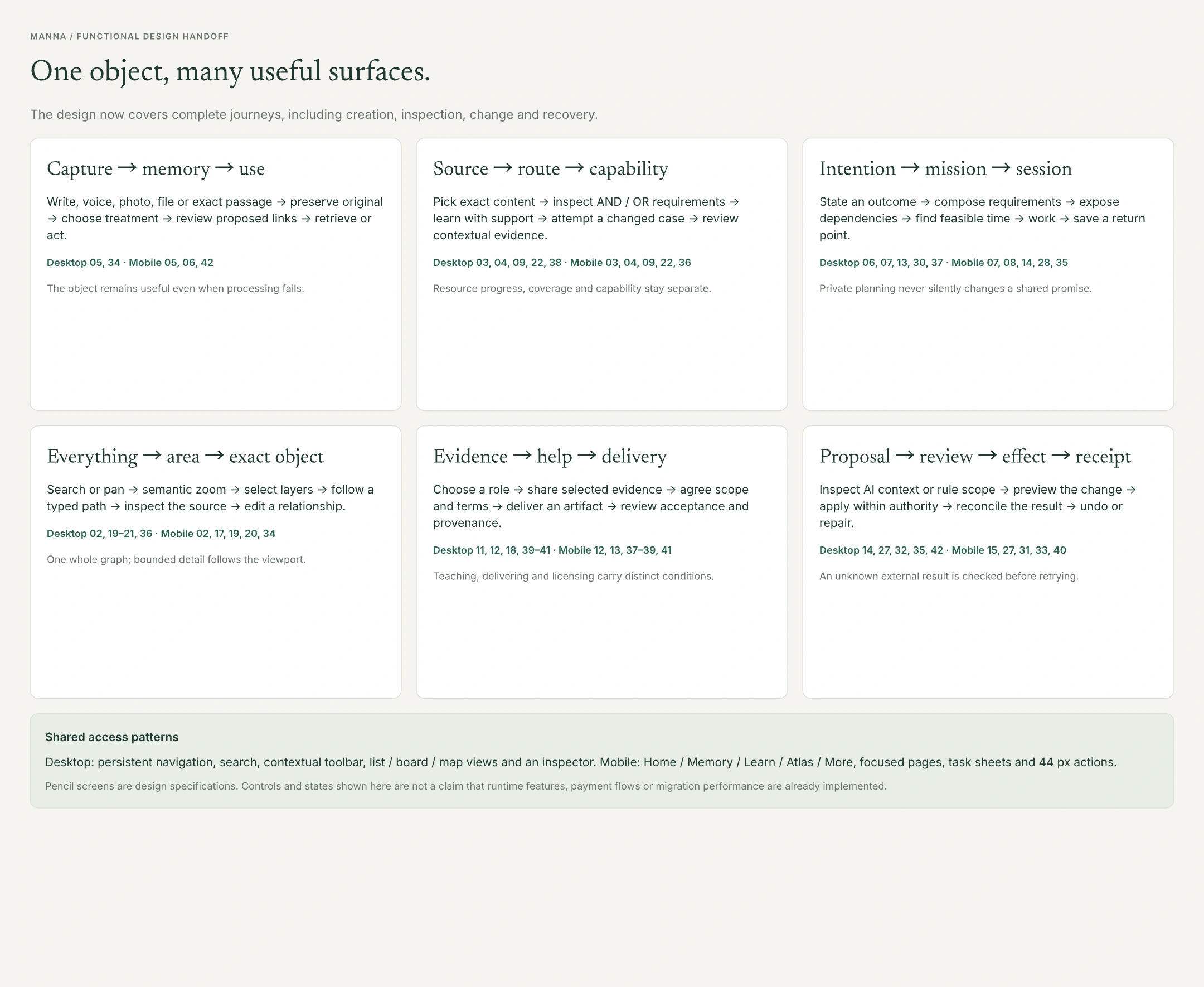
The workflow board connects each journey to numbered desktop and mobile screens. Use the complete registers below to locate exact canvas nodes.
Home and memory
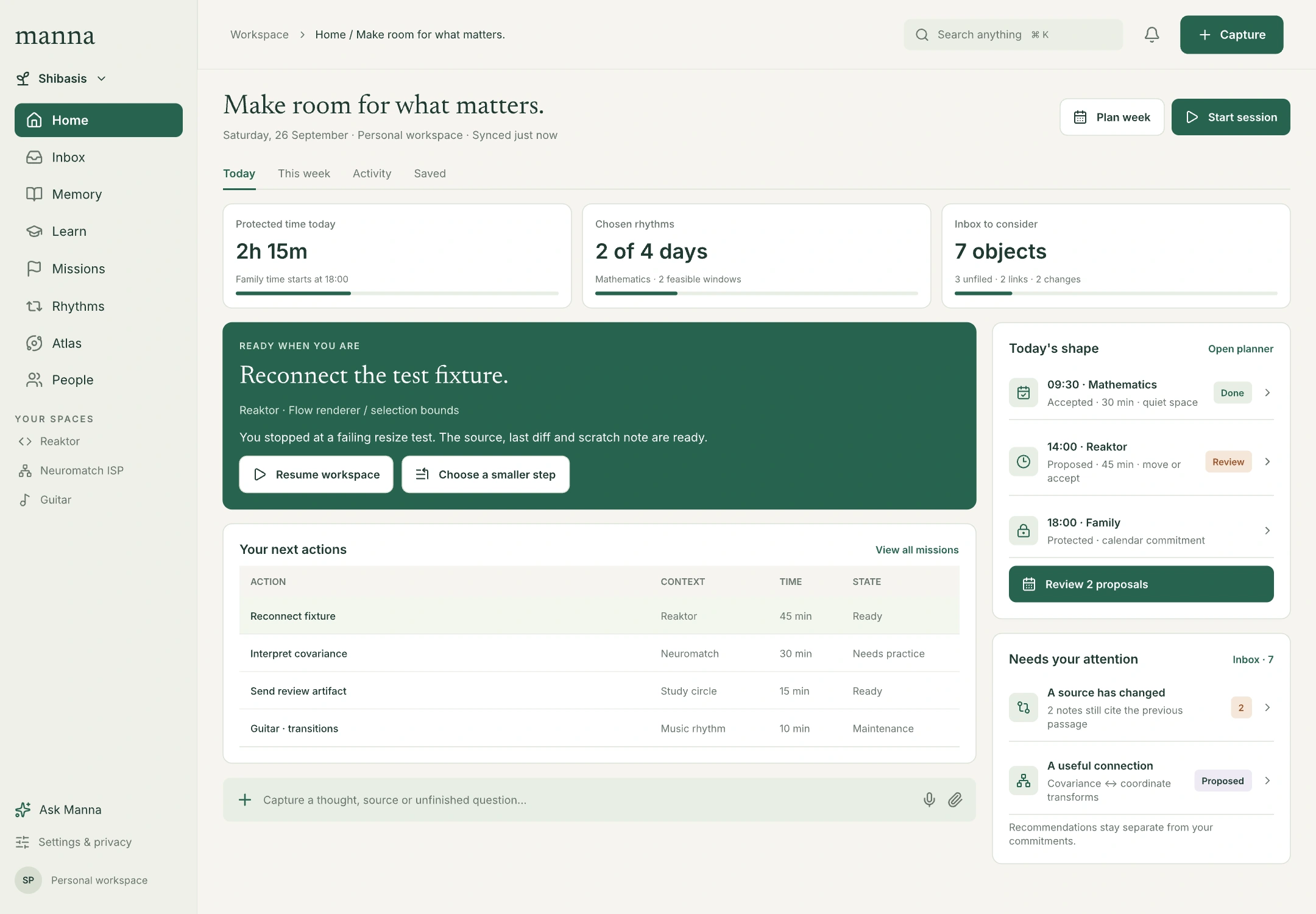
Home presents accepted work, available capacity, the day's agenda, inbox decisions and a saved work context. Recommendations remain visibly distinct from commitments.
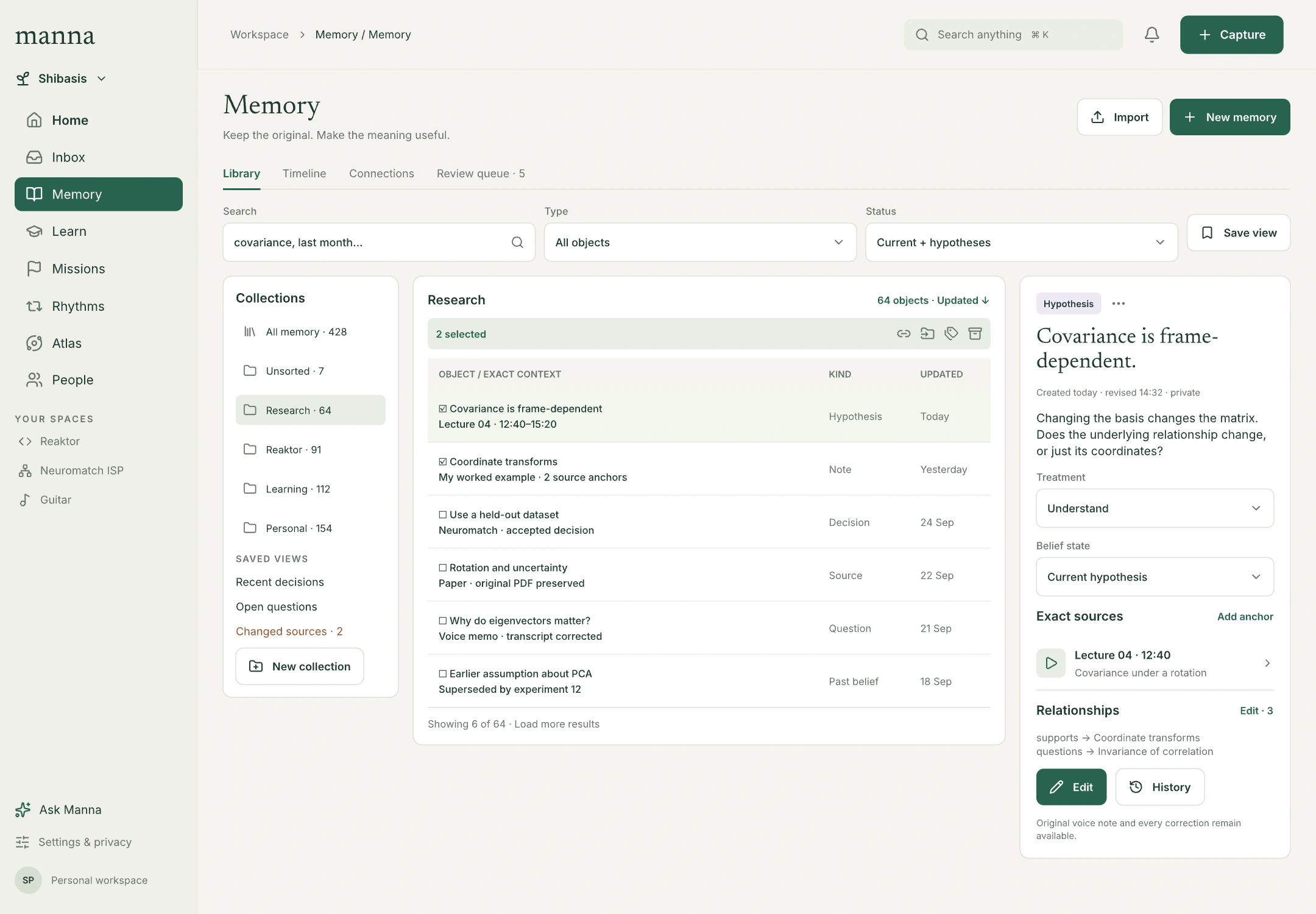
Memory is an object workspace. Collection filters and bulk selection lead to a selected record with its belief state, treatment, exact sources, typed relationships and history. Unsorted captures are valid records.
Learning and evidence
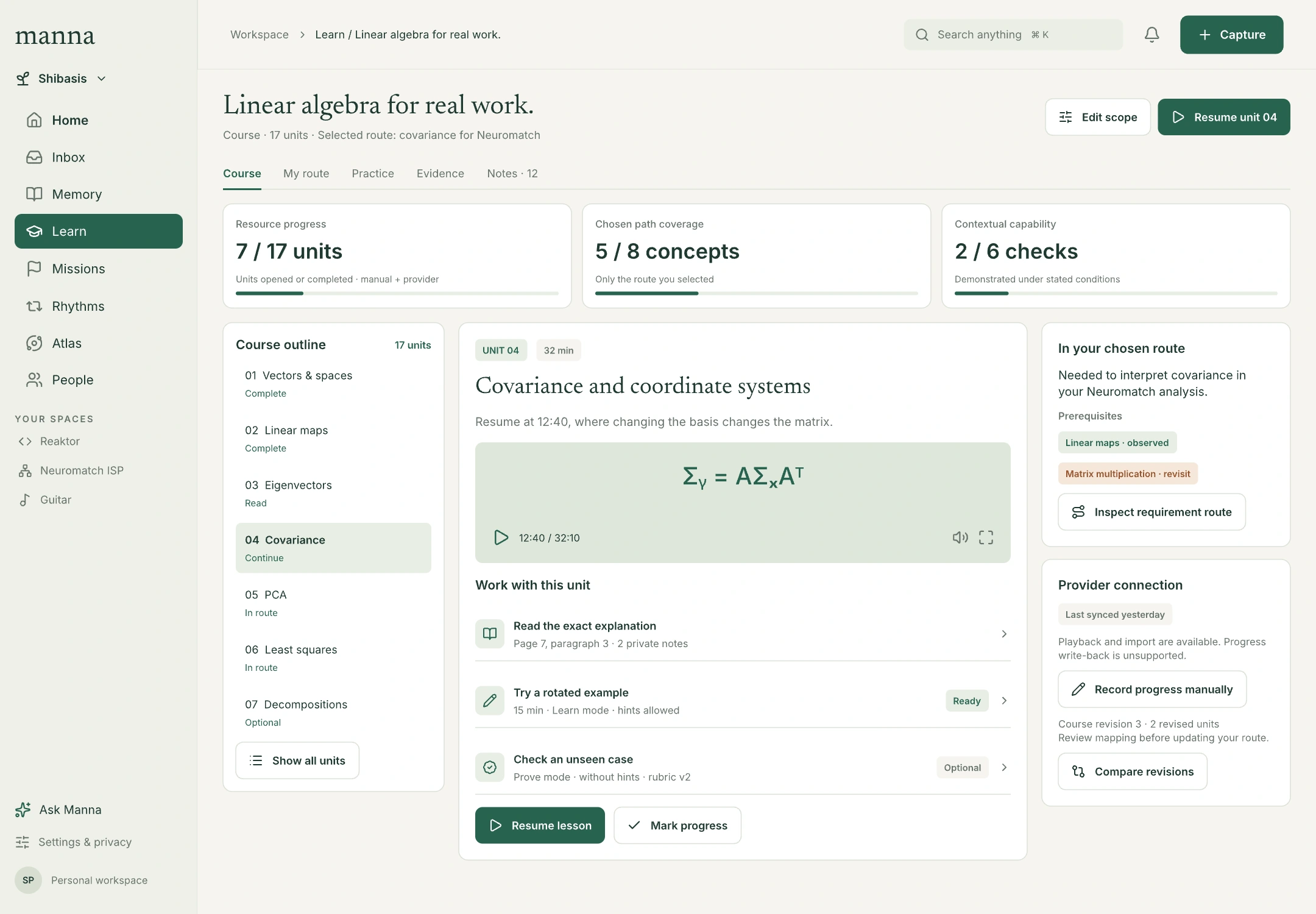
A course includes its ordered outline, exact resume location, provider limitations and route inspector. Resource progress, selected-path coverage and contextual capability have separate denominators. The practice studio exposes support use, artifacts, criteria and prior attempts.
Routes show required branches, alternatives and a distinct integration check. A supported delivery route can involve a tool or mentor without converting their contribution into the learner's independent capability.
The full knowledge map
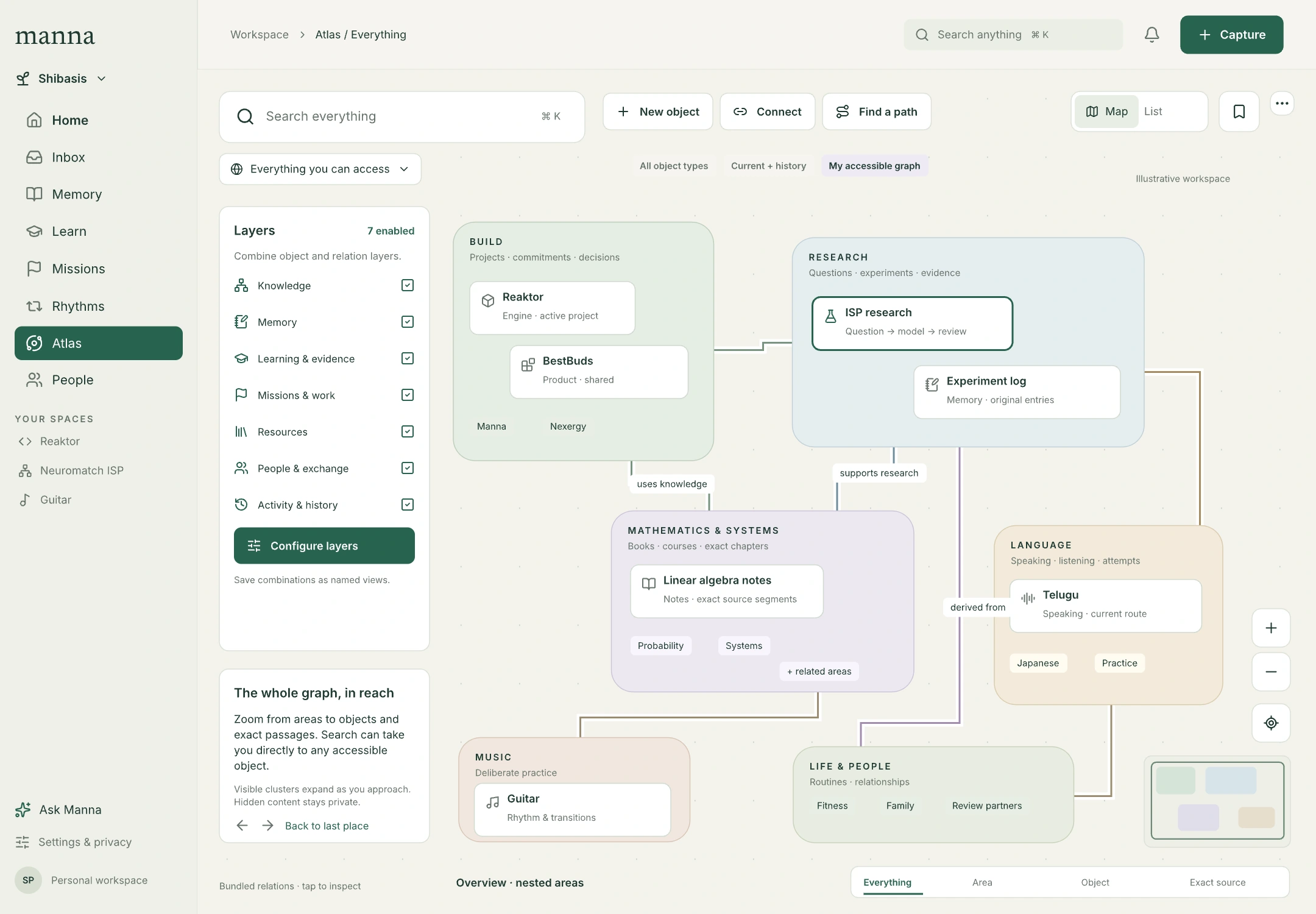
Atlas remains a first-class surface. It now includes object creation, typed connection editing, path finding, object/relation filters, source inspectors, saved views and navigation history. The overview is one level of a continuous map, not a replacement for the full catalogue.
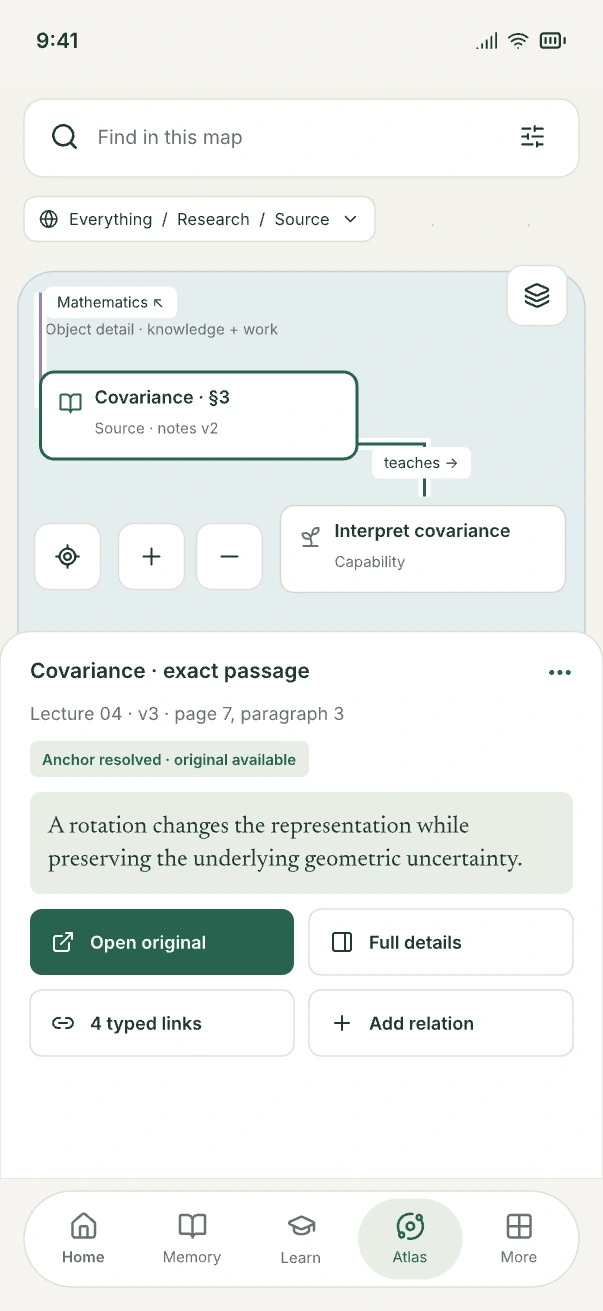
On mobile, a bounded map viewport and task sheets preserve orientation. The selected-source sheet offers the exact original, full details and typed-link actions. Complex editing moves into a focused page.
Work, context and recovery
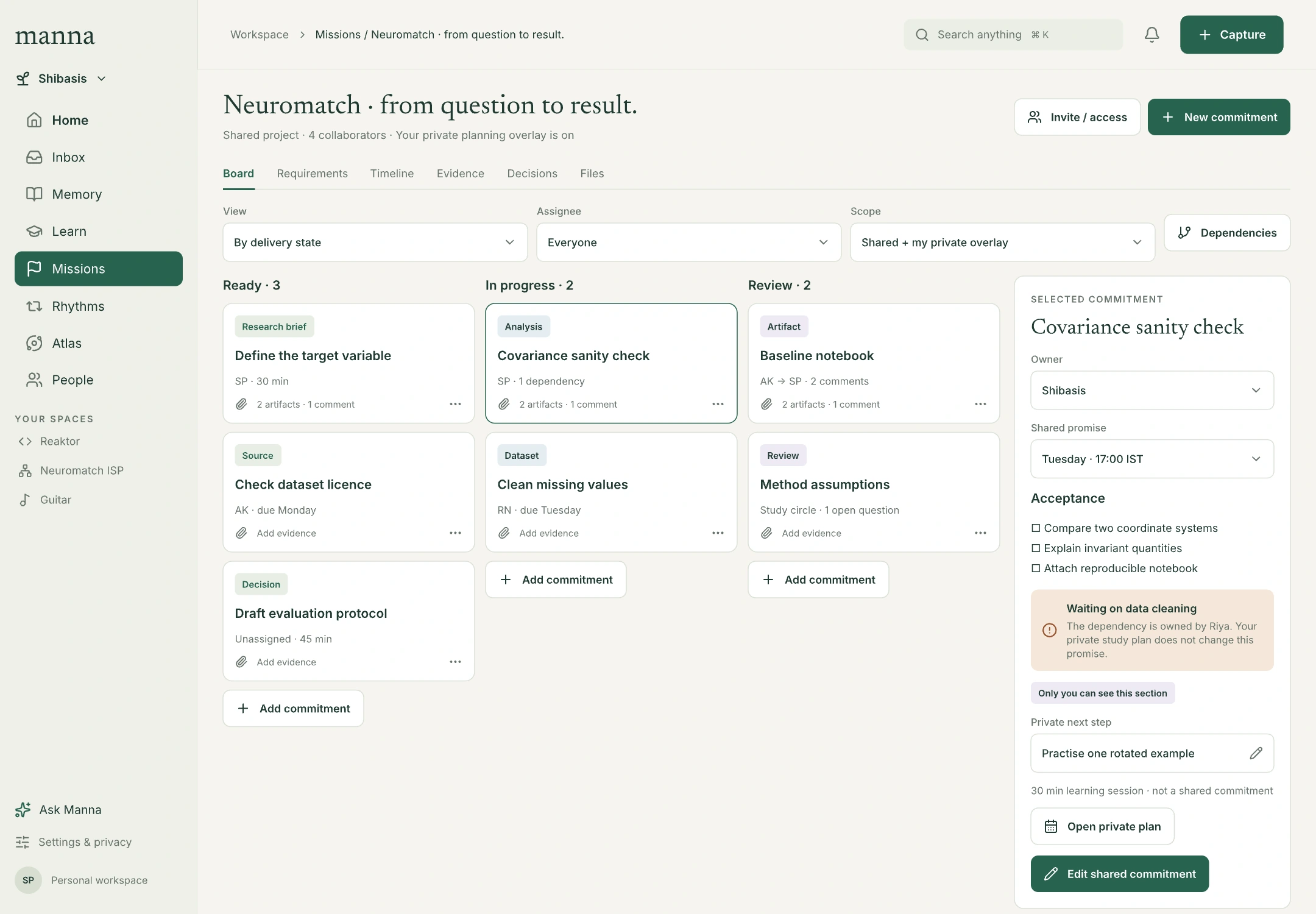
The project board separates shared commitments from the user's private planning overlay. Work sessions preserve artifacts, source revisions, decisions, actual activity and a concrete next action.
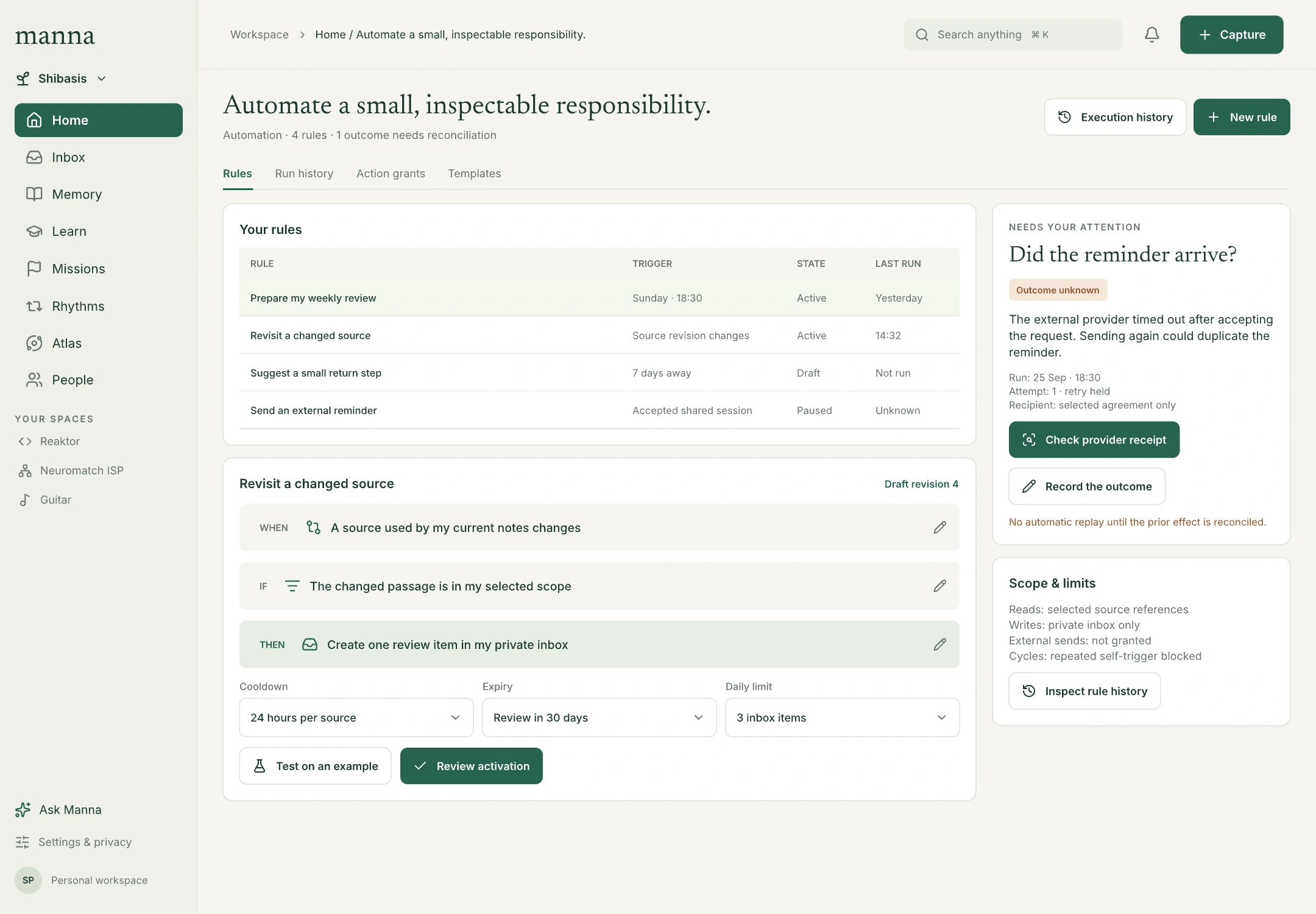
AI responses have source citations and reviewable proposals. Automation combines a trigger, condition and bounded effect with cooldown, expiry, budget and authority. An uncertain external result has receipt inspection; it is not a reason to repeat the action automatically.
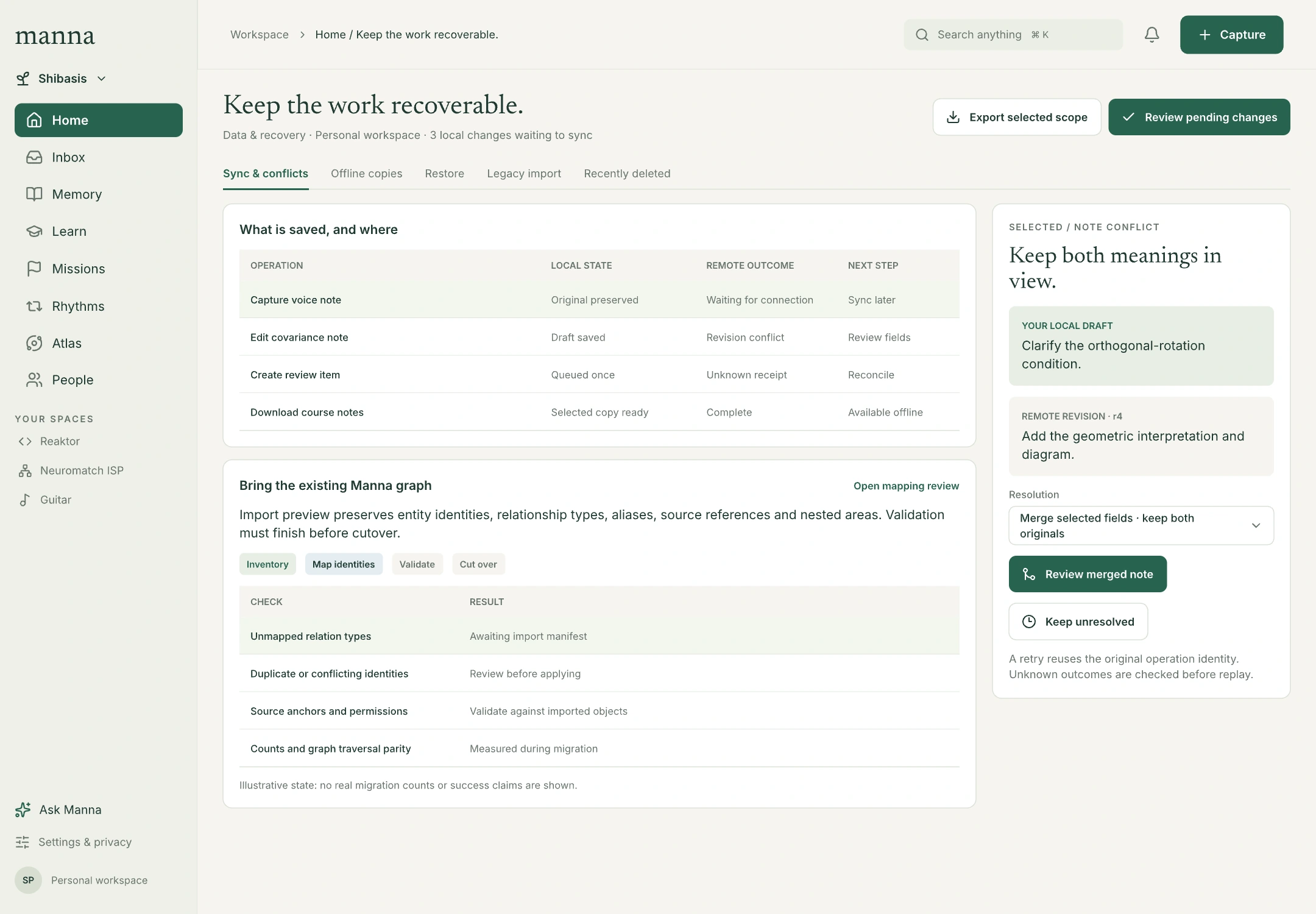
Recovery shows what is local, queued, conflicted or unknown. Legacy import has identity and relation mapping, validation and cutover stages. The migration is a planned replacement: the old app may be offline while the graph, MCP, auth clients and useful infrastructure are retained and reconnected. The recovery screen represents import and reconciliation, not a requirement to operate old and new apps together. No actual migration count or success is invented.
Mobile capability without a compressed desktop
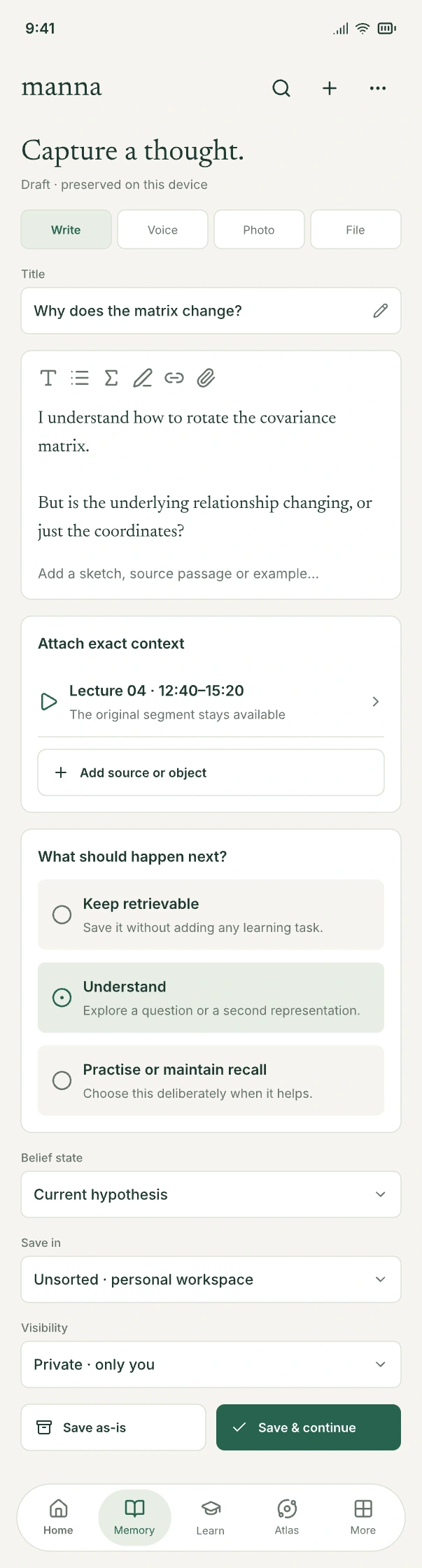
Mobile retains the same domain operations through focused pages, grouped rows, selection modes, larger fields and task sheets. Long frames represent complete scroll content. Atlas uses a bounded 402 × 874 map viewport.
Capture demonstrates the pattern: preserve the original, edit the meaning, attach a source, select treatment and save. Saving need not start processing or learning work.
3 Interaction and implementation contracts
The HLD owns the source-grounded architecture. These obligations map the visual decisions onto Surface and graph contracts; they do not invent new framework APIs.
| Design element | Implementation obligation |
|---|---|
| Search, list, map and source | Preserve stable identity, source revision, scope, permission context, selection and navigation history across projections. |
| Editor and inspector | Keep a revisioned draft, validate a typed change, preview material effects and reconcile the result. Widget state is not the authoritative record. |
| Bulk actions | Apply explicit scope to selected identities; show partial failure and undo where supported. |
| Original and derived material | Persist originals first. Corrections retain previous versions and queue affected derivations for review. |
| Evidence | Carry task family, conditions, assistance, tool/collaborator contribution, artifact revision, rubric, evaluator and uncertainty. |
| Plans and rhythms | Separate intention, proposal, accepted session, notice and observed activity; count overlapping activity once in parent totals. |
| AI context | Assemble the permitted packet for a purpose. Preserve exact sources, disagreement, freshness, grants and expiry. |
| External effects | Reuse operation identity on retry and reconcile ambiguous outcomes before repeating consequential effects. |
| Shared work and commerce | Keep grants, agreed scope, acceptance, rights and funding state explicit. Payments need a qualified implementation. |
| Mobile and desktop | Share domain contracts and state semantics while allowing different navigation and composition. |
A canvas control specifies intent. Bind it to command, validation, permission, loading, receipt and failure behavior before describing it as functional.
The server plane is shared Reaktor Server plus Cloudflare Workers and the Reaktor stack. Generic auth and graph/database services support multiple apps. Small Manna and BestBuds APIs compose app-owned domain handlers; the shared host keeps hardcoded product policy minimal. These are logical service boundaries, not a requirement for a separate Manna server deployment. See the HLD system structure.
4 Navigating the entire legacy graph
The design accommodates the whole-graph model through everything → area → object → exact source. A selected route survives scale changes. Layers choose what is shown; permission scope determines what may be read.
This requires the HLD's bounded queries, stable semantic clustering, viewport loading and explicit states for folded, filtered, pending, unavailable and unknown content. “Everything” cannot mean rendering every node and edge at once. Permission checks apply before retrieval, aggregation and ranking, including counts and derived features.
The layout is compatible with a very large imported graph. Actual capacity must be established with the legacy inventory, identity/relationship parity, anchor and access checks, worst-case traversals, pan/zoom latency, memory budgets and snapshot/restore qualification for the planned cutover. The design alone cannot certify those results.
5 State and accessibility coverage
The interaction-state board defines empty data, failed processing, limited permission, stale anchors, offline drafts, unknown outcomes, infeasible schedules, insufficient evidence and keyboard selection.
Desktop uses 1440 × 1000 frames and a 216 px navigation rail. Mobile uses a 402 px width, 44 px primary actions and natural wrapping. Most mobile boards show full scroll content; runtime navigation must respect platform safe areas and remain available through the intended scroll behavior.
Color reinforces written labels. Unknown is not failure, maintenance is not missed adherence, and a proposed relation is not an accepted fact. Keyboard, screen-reader list alternatives and reduced motion require implementation qualification.
6 Complete canvas register
Numbers are screen labels. Node IDs locate the exact top-level frame in the maintained Pencil file.
42 desktop screens
| Screen or board | Canvas node |
|---|---|
| 01 · Home & continuity | vDyvA |
| 02 · Atlas / everything map | XOBJX |
| 03 · Source / exact segment & coverage | onuTa |
| 04 · Capability routes / requirements and evidence | Tm448 |
| 05 · Memory / library, originals and derived records | sQ7uF |
| 06 · Work session / pause & continuation | pZUSq |
| 07 · Shared project / commitments & private overlay | az7CH |
| 08 · Research / lineage & change impact | md1OD |
| 09 · Learning studio / changed attempt | Fxa5D |
| 10 · Spoken language / deliberate turns | bjFyQ |
| 11 · People / help, circles & offers | l1OWJ3 |
| 12 · Review agreement / selective sharing | DzOOt |
| 13 · Near-term plan / protected capacity | PnxuN |
| 14 · Ask Manna / bounded context & proposal | i46hAv |
| 15 · Arena / voluntary challenge contract | q0ExRU |
| 16 · Settings / integrations, privacy & control | YqFjw |
| 17 · Resource catalogue / qualified comparison | Rhj31 |
| 18 · Skill passport / contextual evidence and publication | Q3PS5 |
| 19 · Atlas / semantic zoom into research | ynpH8 |
| 20 · Atlas / exact source and connections | Ug6MB |
| 21 · Atlas / relationship layers and saved views | xCb4o |
| 22 · Course / exact resume and three kinds of progress | efBOH |
| 23 · Rhythms / cadence, qualifying activity and feasible windows | qC5et |
| 24 · Rhythm editor / quotas, qualification and maintenance | Jj996 |
| 25 · Recurrence / edit scope, time zone and import validation | AB02D |
| 26 · Recommendations / intention, actual reasons and feedback | ZdeCp |
| 27 · Automation / bounded rules and inspectable outcomes | o1Aagq |
| 28 · Attention / one budget across suggestions and rules | AQ7vj |
| 29 · Welcome / begin with a useful object | py5LX |
| 30 · Return / restored context and a reversible plan change | b0YKG |
| 31 · Identity review / possible match, provenance and reversal | fR6kc |
| 32 · Inbox / processing, proposals and bulk actions | hzLCR |
| 33 · Search / exact, semantic, temporal and graph results | G0U5dF |
| 34 · Capture / multimodal editor and intentional treatment | VvIeE |
| 35 · Source repair / anchors, correction and change impact | gwRmJ |
| 36 · Relationship editor / typed, directed and evidenced edges | rzEDe |
| 37 · Missions / portfolio, requirements and protected capacity | S9UqDA |
| 38 · Learn / courses, routes, review budget and activity selection | ZQ3rh |
| 39 · Offer builder / external work, scope, price and availability | u17Duy |
| 40 · Engagement / delivery, scope change and funding state | zeEO4 |
| 41 · Creator studio / licensing, attribution and eligible usage | hhKZF |
| 42 · Recovery / offline sync, restore and legacy graph import | h4kggw |
43 mobile screens
| Screen or board | Canvas node |
|---|---|
| 01 · Home / continuity, agenda and decisions | bAhh6 |
| 02 · Follow a connection. | iA8zZ |
| 03 · Covariance, in context. | RZ9FY |
| 04 · Choose your route. | k9P4S |
| 05 · Keep the thought. | WZmLD |
| 06 · Save it as it is. | x56QXj |
| 07 · Leave a way back. | C9zC62 |
| 08 · Neuromatch ISP | rGRau |
| 09 · Try a changed example. | Yzzlx |
| 10 · Language / conversational practice and support | cgDTJ |
| 11 · One useful thing to revisit. | nf1Hl |
| 12 · Find useful help. | tMse5 |
| 13 · Share just what’s needed. | ha6lj |
| 14 · Room for what matters. | ZIODf |
| 15 · Think with your context. | M4zfuo |
| 16 · Your context. Your choices. | HYiT7 |
| 17 · Atlas / everything map | m441zb |
| 18 · Arena / task contract and evidence | nDy9e |
| 19 · Atlas / layer bottom sheet | jB9TY |
| 20 · Atlas / selected exact source | wCNlp |
| 21 · Welcome / a useful first object | xHGqM |
| 22 · Course / exact resume and separate progress | Bdl46 |
| 23 · Rhythms / cadence and feasible windows | BfDDR |
| 24 · Rhythm editor / quotas and maintenance | zxWat |
| 25 · Recurrence / scope and occurrence preview | w4Y6ve |
| 26 · Recommendation / actual reasons and choices | ldlED |
| 27 · Automation / a bounded personal rule | nUToF |
| 28 · Return / restored context and a smaller start | GRp3N |
| 29 · Attention / shared limits and separate consent | nJGsH |
| 30 · Identity review / provenance and reversal | lhTPV |
| 31 · Inbox / decide and process | gVD9a |
| 32 · Search / filters and historical preview | FJ20p |
| 33 · Source repair / exact anchor and downstream review | wIGB9 |
| 34 · Relationship editor / endpoints, meaning and provenance | TXVoU |
| 35 · Missions / outcomes and draft creation | ZwHil |
| 36 · Learn / activity modes, courses and chosen review budget | TyIW2 |
| 37 · Offer builder / scope and evidence | O98PG |
| 38 · Engagement / delivery and acceptance | o0Y18v |
| 39 · Creator studio / rights, attribution and usage | BN7mT |
| 40 · Recovery / offline state, conflicts and safe replay | VaFCo |
| 41 · Skill passport / evidence, conditions and selective sharing | ljd43 |
| 42 · Memory library / collections, filters and bulk selection | HZhAN |
| 43 · More / complete workspace directory and quick actions | wkyyx |
7 reference and component boards
| Screen or board | Canvas node |
|---|---|
| 00 · Start here · Manna design system | joheW |
| 00g · Interaction states / resilient by design | MOyUV |
| 00b · Reusable navigation & components | P9gh7k |
| 00c · Read the design / scope & interaction map | eNhEi |
| 00d · Atlas map / behavior, layers and recovery | IYo7i |
| 00e · Updated brief / coverage and implementation handoff | xwNR0 |
| 00f · Functional UI kit · Actions, inputs, lists and state | K6wmU |
7 Verification and delivery
The final canvas checks found no child clipping beyond a 0.5 px numerical tolerance, no overlapping top-level frames, and no unfinished placeholders. Major workspace types and mobile task sheets were visually inspected. All 92 frames were exported for the review gallery.
Five reusable components carry desktop navigation, the global toolbar, mobile navigation and primary/secondary actions. Shared variables preserve Manna's visual language.
These checks cover the design artifact. Runtime interaction tests, assistive-technology checks, graph performance, provider failure simulations and migration parity remain implementation gates in the Manna HLD.